
Can Passkeys Be Hacked? Real-World Vulnerabilities and Phishing Resistance
Build a compliant 2026 small business password policy with NIST length rules, password manager rollout steps, and MFA enforcement checklists.
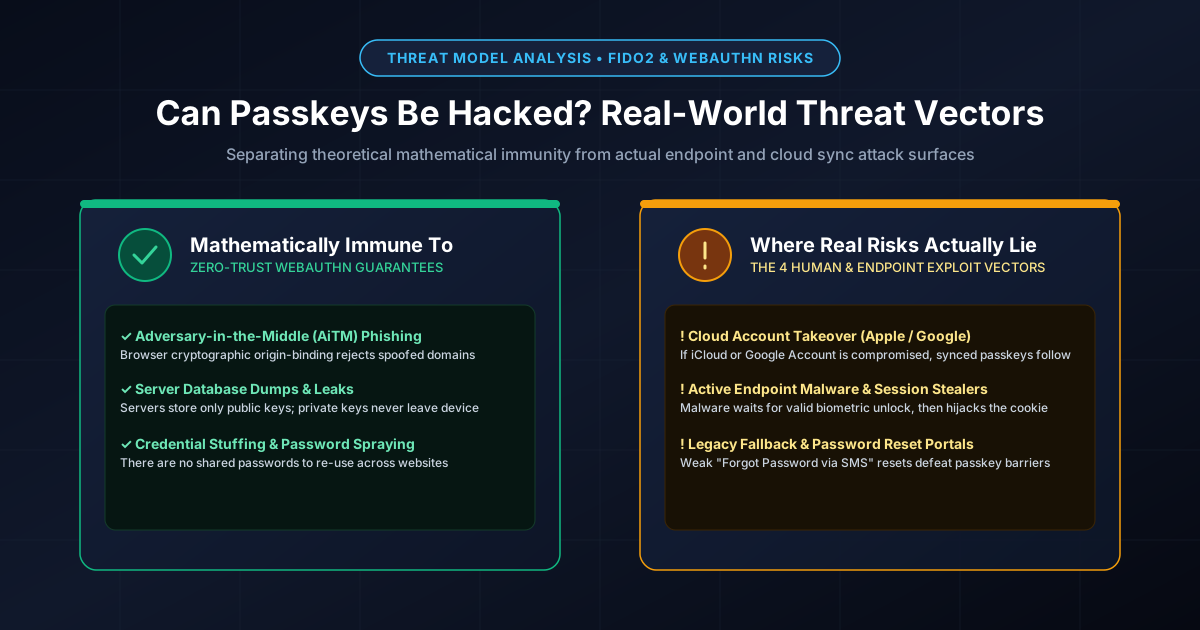
Figure 1.1: WebAuthn cryptographic guarantees vs. real-world endpoint and cloud threat vectors.
Quick Answer: Mathematically and over the network, passkeys cannot be phished or brute-forced because they rely on asymmetric cryptography (public/private key pairs) and strict browser origin-binding. However, in the real world, passkeys can still be compromised through four primary non-cryptographic attack vectors: (1) Cloud sync account hijacking (taking over the victim's Apple ID or Google Account), (2) Post-authentication endpoint malware (infostealers harvesting session cookies after legitimate login), (3) Physical device theft with shoulder-surfed screen PINs, and (4) Legacy account recovery bypasses (where websites allow attackers to reset access using insecure SMS or email OTPs).
Why Traditional Phishing and Server Leaks Fail Completely
To understand what makes passkeys revolutionary, consider why legacy authentication fails. With traditional passwords, an attacker who intercepts your transmission (via an Evilginx Adversary-in-the-Middle proxy) or hacks the website's database gets your shared secret. Even traditional two-factor authentication (SMS OTPs or push approvals) can be intercepted or fatigued.
As covered in our deep-dive on how passkeys work under the hood, WebAuthn changes the paradigm through two cryptographic guarantees:
- Origin Binding: The browser automatically injects the exact, unforgeable domain origin into the cryptographic challenge. If an attacker lures you to a phishing domain like
paypal-secure-login.com, your browser looks for credentials registered to that specific string. It refuses to invoke the private key registered topaypal.com. The phishing site receives zero data. - Asymmetric Zero-Trust Storage: The website server stores only your public key. If the website suffers a catastrophic database leak, attackers obtain a list of public keys. Public keys can only verify mathematical signatures; they cannot forge them or log into accounts.
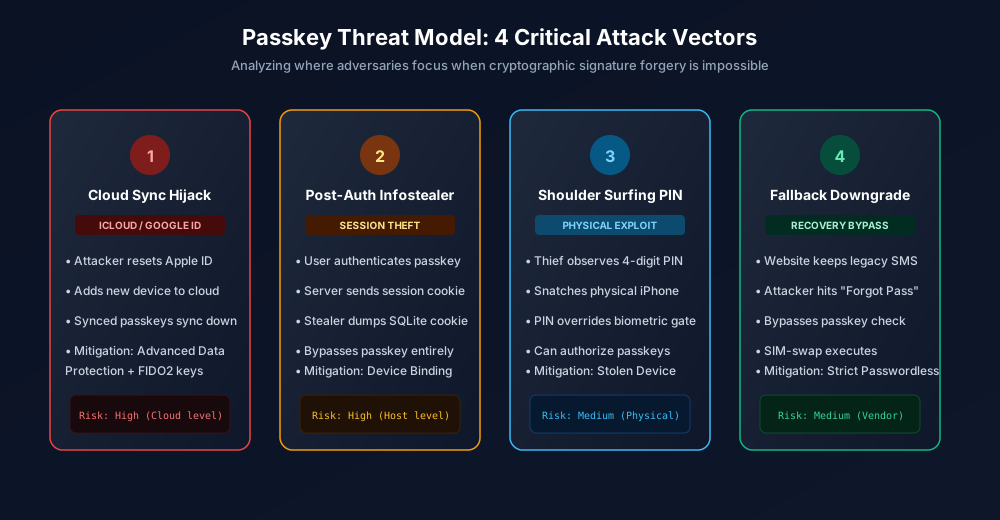
Figure 1.2: The four real-world attack vectors that threaten passkey-secured ecosystems.
The 4 Real-World Attack Vectors Against Passkeys in 2026
1. Cloud Synchronization Account Hijacking
Most consumer passkeys are multi-device synced passkeys stored in Apple iCloud Keychain, Google Password Manager, or password manager vaults (such as 1Password or Bitwarden). These ecosystems synchronize your private keys across your laptops, tablets, and smartphones using end-to-end encryption.
The vulnerability here is not WebAuthn; it is the underlying cloud account. If an attacker gains access to your primary Google Account or Apple ID (via a compromised recovery email, SIM-swap, or weak master password), they can enroll a new device into your cloud ecosystem. Once authorized, the cloud provider syncs down your private passkeys, granting the attacker instant access to all linked services.
2. Post-Authentication Infostealers & Session Hijacking
As detailed in our analysis of how infostealer malware steals passwords, attackers do not need to steal your private cryptographic key. When you touch your fingerprint scanner to authenticate a passkey, the website server validates the cryptographic signature and issues a session cookie (e.g., SID, session_id).
If your device is infected with an infostealer (such as LummaC2 or RedLine), the malware monitors your browser. The moment you authenticate, the stealer copies the active session cookie from RAM or disk and exfiltrates it to a command-and-control server. The attacker imports that session cookie into an anti-detect browser and enters your account without ever touching the passkey.
3. Physical Device Theft Combined with Shoulder Surfing
On smartphones, biometric authentication (Face ID / Touch ID) has a fallback: the device screen lock PIN. If a criminal observes you entering a simple 4-digit PIN at a bar (shoulder surfing) and then snatches your physical phone, they have full access:
- They unlock the device using the observed screen passcode.
- When iOS or Android prompts for biometrics to authorize a passkey login, failing Face ID allows the user to tap "Enter Passcode".
- The thief enters your screen PIN, unlocks the Secure Enclave, and authorizes the passkey to drain bank accounts or access corporate email.
To defend against this, review our guides on securing your iPhone passcode and Android lock screen defense.
4. The Fallback Downgrade Trap (Weak Recovery Portals)
Perhaps the most widespread real-world bypass is website implementation error. Many online retailers and banking platforms allow users to log in with a passkey, but leave their legacy "Forgot Password" or "Sign in with SMS Code" portals wide open.
An attacker who wants into your account simply avoids the passkey prompt entirely, clicks "Trouble signing in?", and executes a SIM swap attack to intercept an SMS reset code. A passkey is only as strong as the weakest alternative recovery path permitted by the website.
Comparison Matrix: Passkey Security Across Implementations
| Attack Vector | Traditional Password | Synced Passkey (iCloud / Google) | Hardware Security Key (FIDO2 YubiKey) |
|---|---|---|---|
| AiTM Proxy Phishing | 100% Vulnerable | Immune (Origin bound) | Immune (Origin bound) |
| Credential Stuffing | 100% Vulnerable | Immune (No shared secret) | Immune (No shared secret) |
| Server Database Leak | Critical (Hashes cracked) | Harmless (Public keys only) | Harmless (Public keys only) |
| Cloud Account Takeover | N/A (Stored per site) | Vulnerable (Syncs to rogue device) | Immune (Private keys cannot export) |
| Post-Auth Cookie Theft | Vulnerable (Session hijacked) | Vulnerable (Session hijacked) | Vulnerable (Session hijacked) |
How to Harden Your Passkey Setup Against Real-World Attacks
- Lock Down Your Cloud Sync Accounts: Enable Advanced Data Protection on Apple devices and enforce hardware security keys on your Google Account. If your cloud account is impregnable, your synced passkeys remain safe.
- Enable Apple Stolen Device Protection: Available on iOS 17.3+, this feature requires biometric verification (Face ID) without passcode fallback for accessing passwords or passkeys away from familiar locations.
- Use Hardware Security Keys for Root Accounts: For your primary email, cloud providers, and master password vaults, use a physical FIDO2 YubiKey. Hardware keys keep the private key physically locked inside the chip, completely immune to cloud sync compromise.
- Generate High-Entropy Fallback Passwords: For services that still require a master password or fallback phrase, never reuse credentials. Generate a 20+ character random password with our Password Generator or a multi-word phrase with our Passphrase Generator.
Frequently Asked Questions
Can hackers clone or extract a passkey from my computer?
No. Passkey private keys are stored within cryptographic secure elements (Apple Secure Enclave, Windows TPM chip, Android Titan M2) or inside end-to-end encrypted password manager vaults. Software running on your machine cannot read or export the raw private key bytes.
What happens if I lose my phone with all my passkeys?
If you use multi-device synced passkeys (Apple Keychain, Google Password Manager, 1Password, Bitwarden), your passkeys are automatically restored when you log into your new device and verify your cloud account identity. If you use a physical hardware key (YubiKey), you must register at least two separate keys to retain backup access.
Are passkeys vulnerable to man-in-the-middle (AiTM) phishing?
No. Passkeys are fundamentally immune to AiTM phishing. The WebAuthn API enforces origin binding directly in the browser runtime. Even if a user is tricked into visiting a counterfeit website, the browser detects the mismatched domain origin and refuses to sign the authentication challenge.
Can a website admin view my passkey private key?
Never. When you register a passkey, only the public key is transmitted to the website server. The website never sees, receives, or stores your private key. Even if the website admin is malicious or their server is fully breached, attackers cannot forge logins.
Related password security guides
Best Password Practices for Small Businesses
A practical small business password safety guide covering password managers, MFA, shared accounts, staff changes, and admin access.
Bulk Password Generator Risks
Learn when bulk password generation is useful, when it creates risk, and how teams should handle many new passwords safely.
Business Password Safety Checklist
Use this practical password safety checklist to protect business email, admin accounts, cloud tools, freelancers, and shared access.
The tools work without analytics. Optional cookies help us understand page visits; passwords and form values are never collected.