
Android Lock Screen Security: PIN vs. Pattern vs. Password Compared
Build a compliant 2026 small business password policy with NIST length rules, password manager rollout steps, and MFA enforcement checklists.
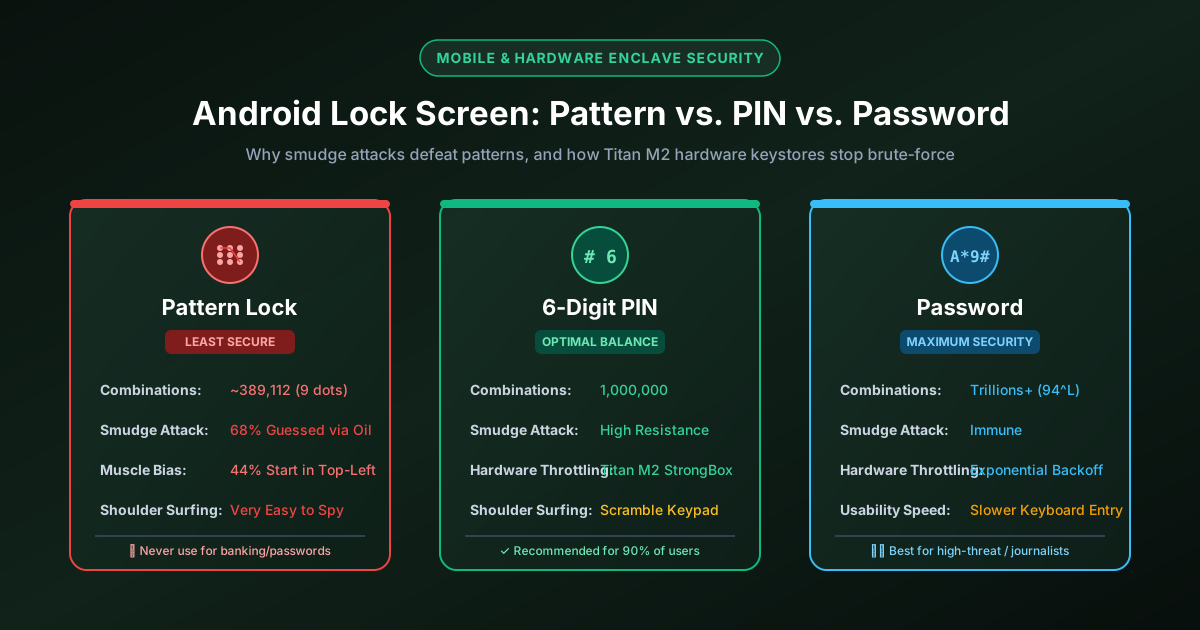
Figure 2.1: Mathematical keyspace and attack surface comparison across Android screen lock methods.
Quick Answer: On modern Android devices, a pattern lock is the least secure method because touchscreen oil residue ("smudge attacks") and predictable human muscle memory allow onlookers to guess the pattern in over 65% of cases. A random 6-digit PIN backed by Android's hardware StrongBox enclave provides the optimal balance of speed and cryptographic security, while an alphanumeric password (8+ characters) offers maximum defense against forensic extraction.
The Fatal Flaws of Android Pattern Locks
Introduced in early Android versions for quick one-handed unlocking, the 3x3 pattern lock remains popular among users. However, cybersecurity researchers consistently demonstrate that pattern locks provide an illusion of security that fails under basic real-world observation.
1. Touchscreen Smudge Attacks
When you swipe your finger across a glass smartphone screen, natural skin oils leave a continuous oily trace. Under standard ambient lighting, an attacker holding a locked phone can tilt the display at an angle and visually reconstruct the exact swipe geometry without needing any technical equipment. Studies show that over 68% of pattern locks can be recovered from oily smudges, even after the phone has been jostled inside a pocket.
2. Severe Human Muscle Memory Bias
While the mathematical maximum number of unique patterns on a 3x3 grid is 389,112, human behavior dramatically compresses this search space:
- Top-Left Starting Point: Over 44% of users begin their pattern at the top-left dot (position 1), and over 77% begin at one of the four corners.
- Letter Shapes: A large majority of users draw simple alphabet characters (such as "C", "L", "N", "S", or "Z").
- Short Length: The average user connects only 4 or 5 dots, reducing the effective keyspace to fewer than 1,000 common combinations.

Figure 2.2: Entropy and threat matrix for Android lock screen authentication methods.
Cryptographic Comparison: Pattern vs. 4-Digit PIN vs. 6-Digit PIN vs. Password
| Lock Screen Method | Total Combinations | Effective Entropy | Smudge Resistance | Shoulder Surfing |
|---|---|---|---|---|
| 3x3 Pattern Lock | 389,112 (theoretical) | < 10 bits (due to bias) | × Very Low (Visible trace) | Easily memorized in 1 glance |
| 4-Digit Numeric PIN | 10,000 | 13.3 bits | Moderate (Taps only) | Easy to observe keypad taps |
| 6-Digit Numeric PIN | 1,000,000 | 19.9 bits | ✓ High (With scrambler) | Difficult to track 6 rapid taps |
| Alphanumeric Password (8+ chars) | > 6 quadrillion | 52+ bits | ✓ Excellent (QWERTY layout) | Virtually impossible to copy |
How Android's Hardware Keystore Protects Your Code
Even though a 6-digit PIN has "only" 1,000,000 combinations, an attacker who steals your physical Android smartphone cannot hook it up to a computer and test 1,000,000 guesses in seconds. Modern Android devices (such as Google Pixel with Titan M2 and Samsung with Knox Vault) utilize dedicated tamper-resistant hardware chips called StrongBox Keymaster:
- Hardware-Enforced Throttling: After 5 incorrect attempts, the hardware chip imposes a 30-second delay. Subsequent failures enforce exponential delays (up to several hours between attempts).
- Cryptographic Binding: Your lock screen PIN derives the Master Encryption Key (MEK) that decrypts user data stored in flash memory. The key derivation occurs inside the isolated security processor, preventing side-channel memory dumps.
- Anti-Replay Counter: The chip maintains an internal non-volatile hardware counter that cannot be rolled back by flashing firmware or rebooting the device.
4 Essential Android Security Settings to Enable Immediately
To maximize your lock screen defense, navigate to your device settings and configure these four critical privacy controls:
1. Enable Android "Lockdown Mode"
Available on Android 9 and newer, Lockdown Mode allows you to temporarily disable biometric unlocking (fingerprint and face recognition) and suppress sensitive lock screen notifications with a single tap from the power menu. If you are traveling through border checkpoints or entering high-risk areas, activating Lockdown Mode ensures the phone can only be decrypted with your alphanumeric password or PIN, preventing forced biometric unlocking.
2. Disable "Make Pattern / Passwords Visible"
Under Settings > Security > Screen Lock, turn off the toggle for "Make pattern visible" or "Show password characters briefly". This prevents onlookers from seeing visual trace trails or characters popping up as you type.
3. Enable Auto-Factory Reset After Failed Attempts
On Samsung devices (under Secure Lock Settings) and stock Android enterprise profiles, enable Auto factory reset after 15 failed attempts. If an attacker attempts physical brute-forcing, all device encryption keys are permanently destroyed.
4. Switch from 4 Digits to an Unbiased 6-Digit PIN
If you are currently using a 4-digit PIN (such as your birth year or 1234), switch immediately to a 6-digit PIN generated by a cryptographically secure random number generator. Generate an unbiased code using our dedicated 6-Digit PIN Generator, and avoid the dangerous patterns documented in our guide to the Most Common PINs to Avoid.
Frequently asked questions
Is a pattern lock or a PIN safer on Android?
A numeric PIN (especially 6 digits) is significantly safer than a pattern lock. Pattern locks leave oily finger smudges on the screen that can be visually reconstructed by anyone holding the phone, and human muscle memory leads over 75% of users to pick predictable letter shapes.
Can hackers bypass an Android lock screen without knowing the PIN?
On modern devices running Android 10 or later with dedicated security chips (like Google Titan M2 or Samsung Knox), physical bypass is extremely difficult. The data partition is encrypted with file-based encryption (FBE), and the hardware chip enforces exponential backoff delays on failed attempts.
What is Android Lockdown Mode?
Lockdown Mode is a security feature that immediately disables fingerprint recognition, face unlock, and lock screen notifications. When activated from the power menu, the phone requires your master PIN or password to unlock, protecting you against forced biometric unlocking.
Does fingerprint or Face Unlock make my PIN obsolete?
No. Biometrics are convenience authenticators, not primary encryption keys. Your device requires your PIN or password upon reboot, after 72 hours of inactivity, after 5 failed biometric attempts, or when accessing Knox/Work profile containers.
Related password security guides
Best Password Practices for Small Businesses
A practical small business password safety guide covering password managers, MFA, shared accounts, staff changes, and admin access.
Bulk Password Generator Risks
Learn when bulk password generation is useful, when it creates risk, and how teams should handle many new passwords safely.
Business Password Safety Checklist
Use this practical password safety checklist to protect business email, admin accounts, cloud tools, freelancers, and shared access.
The tools work without analytics. Optional cookies help us understand page visits; passwords and form values are never collected.