
How Passkeys Work Under the Hood: WebAuthn, FIDO2, and Public-Key Cryptography
Build a compliant 2026 small business password policy with NIST length rules, password manager rollout steps, and MFA enforcement checklists.
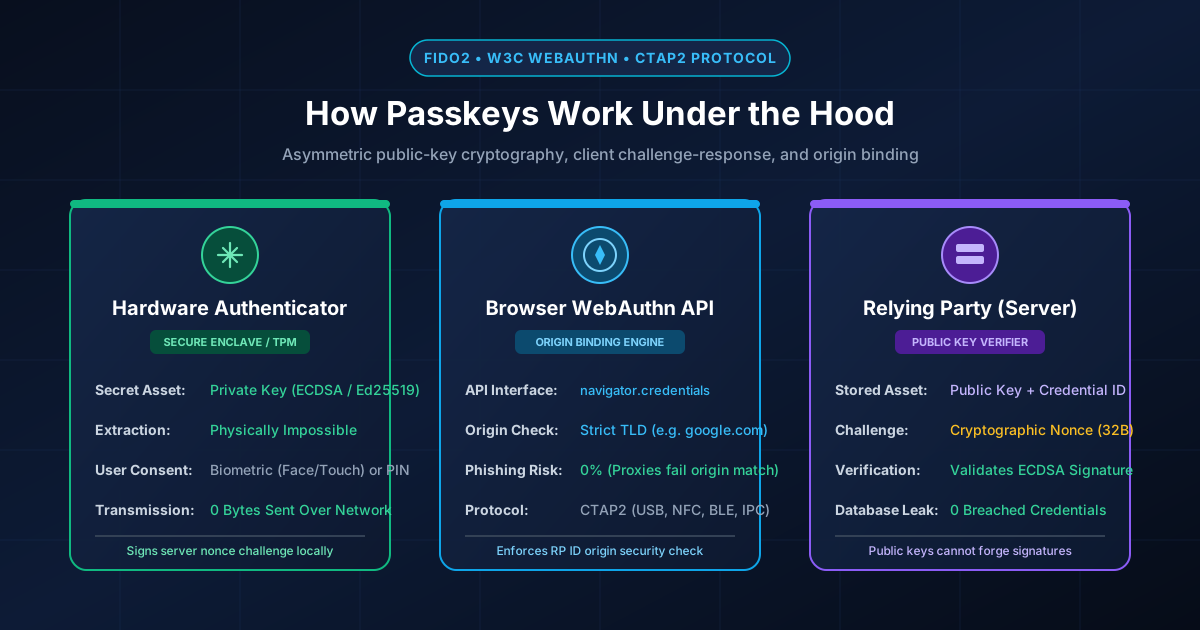
Figure 1.1: WebAuthn, CTAP2, and FIDO2 authentication architecture connecting client authenticator to relying party server.
Quick Answer: When you register a passkey, your device generates a unique public/private cryptographic key pair using the WebAuthn standard. The public key is sent to the website server, while the private key remains locked inside your device's Secure Enclave, TPM chip, or password manager vault. During login, the server sends a single-use mathematical challenge (nonce) which your device signs locally upon biometric confirmation. Because the private key never travels across the network, passkeys cannot be stolen via phishing, keyloggers, or database dumps.
The Three Architectural Pillars: FIDO Alliance, W3C WebAuthn, and CTAP2
To understand the engineering behind passkeys, it is essential to distinguish between the three technical standards that enable passwordless authentication:
- FIDO2 (Fast ID Online 2): The overarching industry project created by the FIDO Alliance (including Apple, Google, Microsoft, and Yubico) to standardize phishing-resistant authentication worldwide.
- W3C WebAuthn (Web Authentication API): The official JavaScript browser standard (
navigator.credentials.create()andnavigator.credentials.get()) allowing web applications to communicate securely with authentication hardware. - CTAP2 (Client-to-Authenticator Protocol): The transport layer that allows your web browser or operating system to communicate with external hardware authenticators via USB, NFC, Bluetooth Low Energy (BLE), or internal system buses.
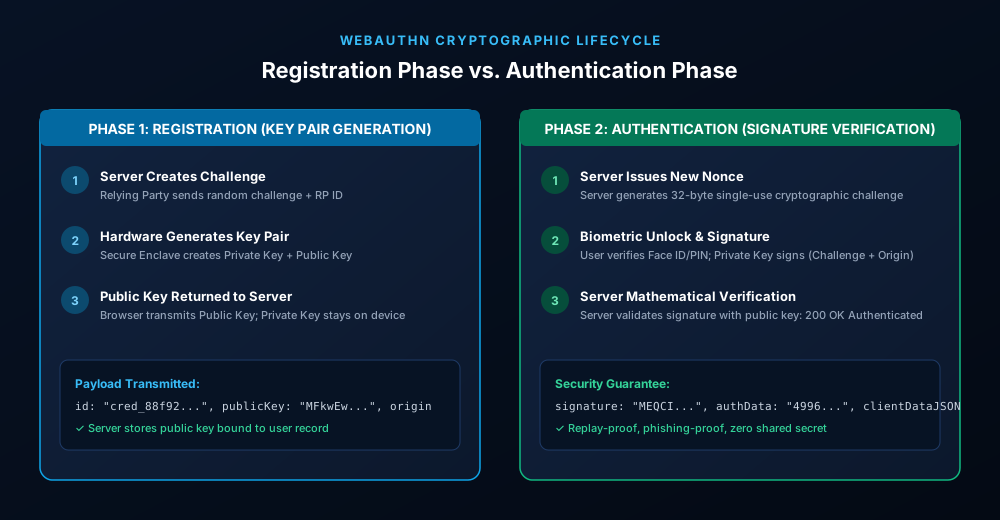
Figure 1.2: End-to-end cryptographic lifecycle: Registration (Key Generation) vs. Authentication (Signature Verification).
Phase 1: Passkey Registration (How Keys Are Generated)
When you click "Create a Passkey" or "Turn On Passkeys" in an online account, the following cryptographic handshake occurs in milliseconds:
- Server Challenge: The Relying Party (website server) creates an options object containing a cryptographically random 32-byte challenge (nonce), the Relying Party ID (
rp.id = "github.com"), user metadata, and supported cryptographic algorithms (such as ES256 / ECDSA over curve P-256 or Ed25519). - Browser WebAuthn Invocation: The browser calls
navigator.credentials.create({ publicKey: options }). The operating system prompts the user for local biometric authorization (Touch ID, Face ID, or Windows Hello PIN). - Key Pair Generation: Upon user confirmation, the hardware authenticator (Apple Secure Enclave, Android Titan M2, or a hardware YubiKey) generates a fresh, unique asymmetric key pair:
- Private Key: Bound permanently to the authenticator storage. It is mathematically impossible to export or read this key via software APIs.
- Public Key: Encoded into a standard W3C Attestation Object along with a unique Credential ID.
- Server Storage: The browser sends the public key, Credential ID, and signature counter to the server. The server stores this public key in the user's database row. The public key is completely harmless if leaked; it can only verify signatures, not forge them.
Phase 2: Passkey Authentication (How You Log In)
When you return to the website to sign in, no password ever passes through the login form:
- Authentication Request: The server generates a fresh 32-byte challenge nonce and issues
navigator.credentials.get({ publicKey: options }). - Hardware Signature: The browser matches the server's Relying Party ID to the stored Credential ID. After the user provides Face ID or fingerprint consent, the device's private key cryptographically signs a payload containing:
- The server's challenge nonce
- The authentic browser origin (e.g.,
https://github.com) - The authenticator data flags (User Present:
UP=1, User Verified:UV=1)
- Zero-Trust Verification: The server receives the cryptographic signature and verifies it using the public key stored on file. If the mathematical signature matches, the server issues an authenticated HTTP session cookie.
The Cryptographic Magic: Why Origin Binding Destroys Phishing Proxies
In traditional phishing, attackers deploy Adversary-in-the-Middle (AiTM) reverse proxies like Evilginx to intercept login forms, session cookies, and SMS/TOTP codes in real time.
Passkeys are 100% immune to this attack by mathematical design:
When you visit a fake lookalike site (such as github-security-login.com), your browser automatically supplies github-security-login.com as the origin payload to the WebAuthn API. Because your private key is cryptographically bound to github.com, your authenticator refuses to sign the payload. Even if an attacker tricked you into tapping Face ID, the signature would contain the fake origin, which the authentic GitHub server would immediately reject as invalid.
Synced Passkeys vs. Device-Bound Hardware Keys
| Architectural Feature | Synced Passkeys (Multi-Device) | Device-Bound Keys (YubiKey / Security Key) |
|---|---|---|
| Storage Mechanism | End-to-End Encrypted Cloud Keychain (iCloud / Bitwarden) | Physical tamper-resistant cryptographic silicon chip |
| Disaster Recovery | Seamless auto-restore when setting up a new phone | Requires registering a secondary backup hardware key |
| Cross-Platform Sharing | FIDO Cross-Device Authentication (QR code scan via BLE) | Plug into USB-C or tap via NFC |
| Phishing Resistance | 100% Phishing-proof (Origin binding) | 100% Phishing-proof (Origin binding) |
| Best Suited For | 99% of consumers, everyday accounts, mobile banking | DevOps root admins, journalists, government compliance |
For accounts and legacy portals that have not yet migrated to FIDO2 WebAuthn, always generate cryptographically unique credentials with our Free Password Generator or generate memorable high-entropy passphrases using our Passphrase Generator.
Frequently asked questions
Can a website read my fingerprint or facial scan when using a passkey?
No. Biometric verification occurs entirely locally on your device's hardware chip (Secure Enclave or Titan M2). The browser and website never see your fingerprint, facial scan, or PIN; they only receive a mathematical cryptographic signature confirming that local authentication succeeded.
What happens if a website where I use a passkey is hacked?
If the website suffers a complete database dump, attackers only obtain your public key. Because public keys can only verify signatures and cannot forge them, the stolen data is completely useless to hackers.
What is the difference between WebAuthn and FIDO2?
FIDO2 is the overall security standard governing passwordless authentication across hardware, operating systems, and browsers. WebAuthn is the specific W3C JavaScript API that allows web developers to implement FIDO2 authentication inside web browsers.
Can I use passkeys across different operating systems?
Yes. Cross-platform password managers like Bitwarden and 1Password synchronize passkeys across Windows, Mac, iOS, Android, and Linux. Additionally, FIDO Cross-Device Authentication allows you to scan an on-screen QR code with your smartphone camera to log into desktop browsers securely via Bluetooth.
Related password security guides
Best Password Practices for Small Businesses
A practical small business password safety guide covering password managers, MFA, shared accounts, staff changes, and admin access.
Bulk Password Generator Risks
Learn when bulk password generation is useful, when it creates risk, and how teams should handle many new passwords safely.
Business Password Safety Checklist
Use this practical password safety checklist to protect business email, admin accounts, cloud tools, freelancers, and shared access.
The tools work without analytics. Optional cookies help us understand page visits; passwords and form values are never collected.