
Infostealer Malware (RedLine, Lumma, Vidar): How Attackers Steal Browser Passwords
Build a compliant 2026 small business password policy with NIST length rules, password manager rollout steps, and MFA enforcement checklists.
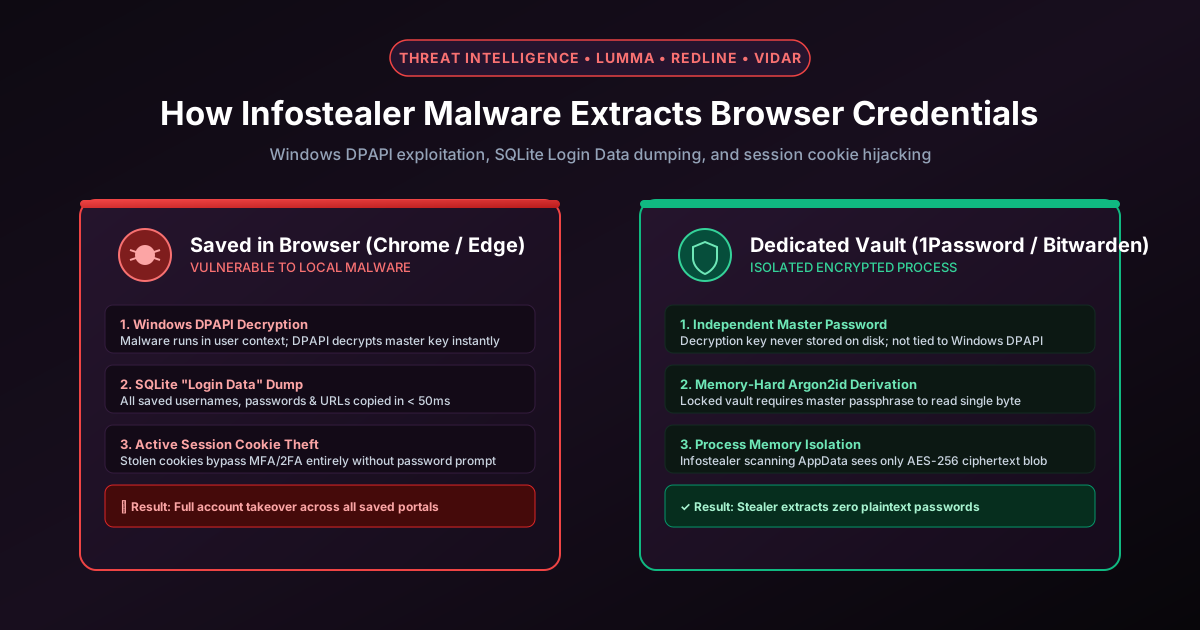
Figure 2.1: Attack surface: Why browsers store credentials in predictable SQLite files vulnerable to infostealer malware.
Quick Answer: Infostealer malware (such as LummaC2, RedLine, Vidar, Stealc, and Raccoon) are specialized trojans that harvest saved browser passwords, session cookies, cryptocurrency wallets, and SSH credentials in under 5 seconds. They exploit the fact that Chromium browsers (Google Chrome, Microsoft Edge, Brave, Opera) store credentials in local SQLite databases encrypted with an AES key protected by Windows Data Protection API (DPAPI). Because DPAPI decrypts data for any executable running under the victim's Windows user session without requiring administrator rights or prompts, infostealers extract plaintext passwords instantly.
The Rise of Malware-as-a-Service (MaaS) Infostealers
Infostealer logs are the primary currency of modern cybercrime markets like Genesis Market and Russian Market. Instead of mounting complex server exploits, cybercrime syndicates purchase infostealer subscriptions for 0 to 0 per month. The malware is distributed via cracked software downloads, malicious Google Ads targeting software keywords, phishing emails, and compromised npm/PyPI packages.
Once executed on a victim's endpoint, the malware operates completely silently in the background, collects hundreds of credentials, zips the data, and exfiltrates it to a command-and-control (C2) server or encrypted Telegram channel before self-terminating.
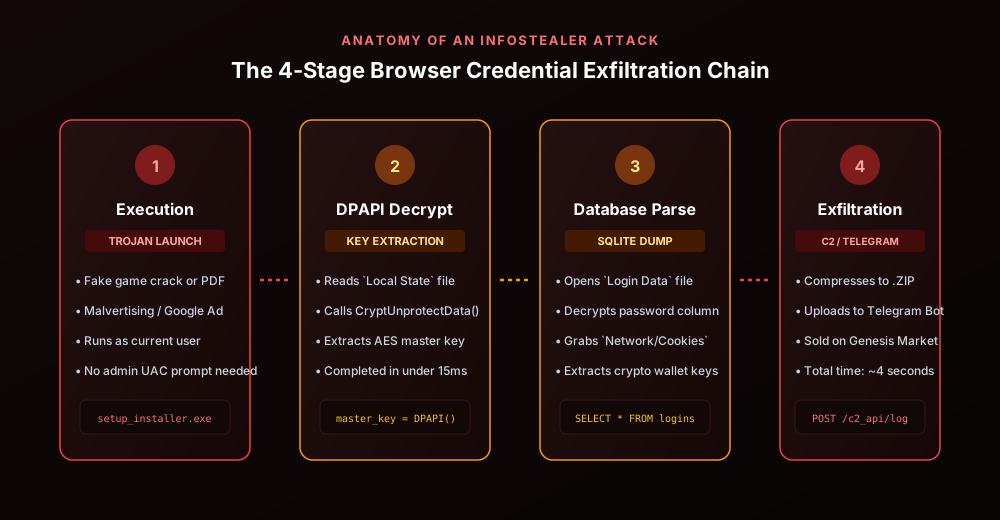
Figure 2.2: The 4-step execution pipeline: Dropper execution, DPAPI unprotection, SQLite parsing, and C2 exfiltration.
How Chromium Browsers Store Passwords: The Anatomy of `Login Data`
To understand why browser password storage is intrinsically vulnerable, look at where Chromium stores credentials on Windows workstations:
# Default Chrome user data directory on Windows
%LocalAppData%\Google\Chrome\User Data\Default\Login Data
%LocalAppData%\Google\Chrome\User Data\Local State
%LocalAppData%\Google\Chrome\User Data\Default\Network\Cookies
The credential extraction process follows a predictable, automated sequence:
- Extract Encrypted Master Key: The malware opens the JSON file
Local Stateand reads the base64-encoded string atos_crypt.encrypted_key. Stripping the leading 5-byte header (DPAPI) yields an encrypted 256-bit AES master key. - Invoke CryptUnprotectData: The malware calls the native Windows API function
CryptUnprotectData(). Because the malware is running under the user's logged-in Windows session, Windows unprotects the key immediately in less than 15 milliseconds without alerting the user. - Query the SQLite Database: The malware connects to
Login Data(which is a standard SQLite3 database) and executes:SELECT origin_url, username_value, password_value FROM logins; - AES-256-GCM Decryption: In modern Chrome, each stored password in
password_valuestarts with the prefixv10orv20, followed by a 12-byte initialization vector (IV), the encrypted ciphertext, and a 16-byte authentication tag. Using the master key extracted in Step 2, the malware decrypts the password into plaintext in milliseconds.
The Flaw in Windows DPAPI: Process Isolation Does Not Exist
The fundamental architectural vulnerability is that Windows DPAPI protects data from other Windows user accounts, but NOT from other processes running under the same user account. When you log into Windows, any executable, macro, or script you launch inherits your user token. Windows has no built-in mechanism to distinguish between chrome.exe accessing your passwords and a malicious invoice.exe or PowerShell script accessing your passwords.
Google introduced App-Bound Encryption in Chrome 127+ to bind decryption privileges to the Chrome binary signature via a privileged system service. However, modern 2026 stealers like Lumma and Meduza bypass this using token impersonation, process injection, and COM object abuse.
Session Cookie Theft: Bypassing Multi-Factor Authentication (MFA)
Even if an organization enforces hardware 2FA keys, infostealers defeat authentication controls through Pass-the-Cookie attacks. By dumping the SQLite database at Network\Cookies, the malware steals valid HTTP session tokens:
__Host-GAPSandSID(Google Workspace accounts)ESTSAUTHandESTSAUTHPERSISTENT(Microsoft 365 / Entra ID)user_session(GitHub Enterprise)AWSALBand console tokens (Amazon Web Services)
When the attacker imports these stolen cookies into an anti-detect browser (such as AdsPower or Dolphin Anty), the cloud provider sees a pre-authenticated session. The attacker accesses corporate email, source code, and cloud infrastructure without knowing the victim's password or triggering a 2FA prompt.
Why Standalone Password Managers Block Infostealers
Standalone zero-knowledge password managers (like 1Password, Bitwarden, KeePassXC) protect credentials using cryptographic isolation fundamentally different from browsers:
| Feature / Security Layer | Browser Password Storage | Standalone Password Manager | Hardware Passkey (FIDO2) |
|---|---|---|---|
| Storage Format on Disk | Standard SQLite Database | AES-256-GCM Encrypted Blob | Secure Element Hardware Chip |
| Decryption Key Derivation | Windows DPAPI (No master password) | Argon2id / PBKDF2 (User master key) | Asymmetric ECDSA / Ed25519 |
| Same-Session Process Immunity | Zero (Any .exe can decrypt) | High (RAM cleared when locked) | Absolute (Biometric physical touch) |
| Session Cookie Protection | Vulnerable to direct SQLite dump | N/A (Cookies handled by browser) | Cryptographically bound origins |
| Overall Infostealer Resilience | Severely Vulnerable | Hardened Defense | Immune by Design |
Practical Defense: How to Neutralize Infostealer Threats
To eliminate your vulnerability to infostealer malware, implement these four defensive measures immediately:
- Disable Browser Password Saving: Open
chrome://password-manager/settingsand disable "Offer to save passwords". Export your existing passwords, import them into an audited password manager, and purge the browser cache completely. - Use Zero-Knowledge Encryption: Read our breakdown on how zero-knowledge encryption protects vaults. Dedicated vaults require a separate master passphrase that is never stored in Windows DPAPI.
- Transition to Passkeys: Wherever supported, replace passwords with passkeys. Because passkeys use WebAuthn origin-binding (as explained in our WebAuthn and FIDO2 guide), malware cannot steal a passkey from a database dump.
- Audit and Strengthen Passwords: Generate unique, random 20+ character passwords for every service using our client-side Password Generator or 24-Character Password Generator.
Frequently Asked Questions
Why does Windows Defender fail to catch infostealers immediately?
Infostealer authors use crypters, code virtualization, and polymorphic compilation to change the malware binary structure every few hours. By embedding the payload inside legitimate signed drivers or executing within memory via reflective DLL injection, they evade traditional signature-based antivirus scanners.
Does multi-factor authentication (MFA) protect against infostealer malware?
MFA protects against password-only attacks, but it CANNOT prevent session cookie hijacking. When an infostealer extracts your browser session cookies, the attacker imports those active session tokens into their own browser and enters your account without being asked for a password or 2FA code.
Are Mac and Linux users safe from browser credential stealers?
No. While Windows DPAPI is the most widely exploited mechanism, malware strains like Atomic macOS Stealer (AMOS) and KeyStealer target macOS Keychain and browser SQLite files, while Linux infostealers target unencrypted GNOME Keyring and Chromium profile directories.
What should I do if my machine was infected with an infostealer?
Immediately disconnect the infected device from the internet. From a known clean device, click "Sign out of all sessions" across all accounts (Google, Microsoft, GitHub, banking) to invalidate active session cookies. Next, reset your master password and rotate all stored credentials starting with primary email and finance accounts.
Related password security guides
Best Password Practices for Small Businesses
A practical small business password safety guide covering password managers, MFA, shared accounts, staff changes, and admin access.
Bulk Password Generator Risks
Learn when bulk password generation is useful, when it creates risk, and how teams should handle many new passwords safely.
Business Password Safety Checklist
Use this practical password safety checklist to protect business email, admin accounts, cloud tools, freelancers, and shared access.
The tools work without analytics. Optional cookies help us understand page visits; passwords and form values are never collected.