
How to Choose a Secure iPhone Passcode (4-Digit vs. 6-Digit vs. Alphanumeric)
Compare 4-digit, 6-digit, and alphanumeric iPhone passcodes in 2026. Learn how Secure Enclave delays and Stolen Device Protection stop thieves.
Upgrading from a 4-digit PIN to a custom alphanumeric passcode expands your lock-screen search space from 10,000 to over 218 trillion combinations.
Quick Answer: While an iOS 6-digit PIN provides 1,000,000 combinations (19.9 bits of entropy) protected by Secure Enclave hardware delays, switching to a custom alphanumeric passcode (8+ characters) expands your keyspace to over 218 trillion combinations, rendering your device virtually uncrackable by public shoulder-surfers and specialized forensic extraction boxes.
Your iPhone passcode does not just lock your display: it is the master cryptographic key that protects Apple Keychain passwords, online banking apps, photo libraries, and Apple Account recovery settings. You can generate an unpredictable numeric code using our free browser-only PIN Generator or test your passcode pattern locally with our Password Strength Checker.
How iOS Lock-Screen Security Works Under the Hood
Apple devices do not store your raw passcode on the flash memory chip. Instead, iOS relies on a dedicated hardware coprocessor called the Secure Enclave:
- Hardware Key Entanglement: When you set a passcode, the Secure Enclave combines your secret with a unique hardware key (UID) burned into the silicon during manufacturing. Neither Apple nor an external hacker can extract or clone this key without the physical chip.
- Escalating Delay Timers: To stop brute-force attacks, the Secure Enclave enforces mandatory delays after failed passcode entries: 1-minute delay after attempt 5, 5-minute delay after attempt 6, 15-minute delay after attempts 7 and 8, and a 1-hour delay after attempt 9.
- Automatic Data Wipe: Enabling the optional Erase Data feature in Settings completely destroys the cryptographic file system key after 10 consecutive failed attempts.
Smartphone Passcode Keyspace Comparison
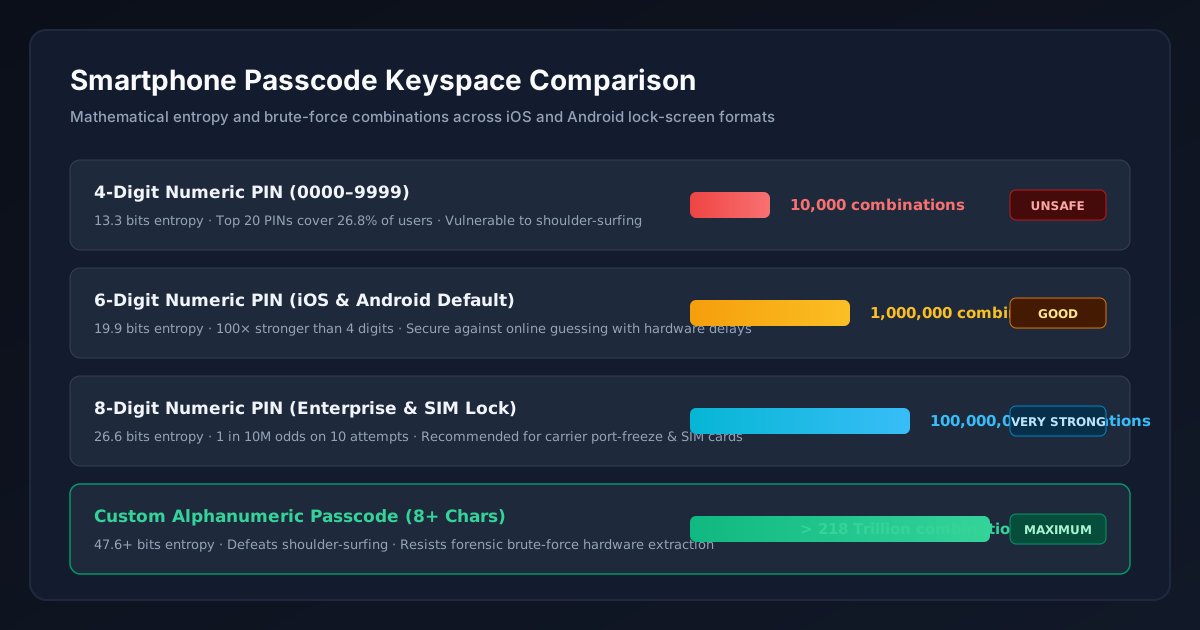
Entropy comparison: 4-digit PIN (10K), 6-digit PIN (1M), 8-digit PIN (100M), vs. 8-char Alphanumeric (>218 Trillion combinations).
| Passcode Format | Combinations | Entropy Bits | Shoulder-Surfing Risk | Forensic Box Resistance |
|---|---|---|---|---|
| 4-Digit Numeric PIN | 10,000 | 13.3 bits | Critical (Memorized in one glance) | Vulnerable to rapid exploitation |
| 6-Digit Numeric PIN | 1,000,000 | 19.9 bits | Moderate (Requires careful observation) | Strong against online guessing |
| 8-Digit Numeric PIN | 100,000,000 | 26.6 bits | Low (Difficult to memorize visually) | Very High (FIDO2 security key grade) |
| Custom Alphanumeric (8+ Chars) | > 218 Trillion | 47.6+ bits | Extremely Low (QWERTY layout disguises entry) | Maximum (Computationally uncrackable) |
The Dangerous Reality of Public Shoulder-Surfing Theft
In recent investigative reports, criminal syndicates targeted victims in bars and cafes by filming or watching them type a 4-digit or 6-digit PIN before pickpocketing their device. With both the physical iPhone and its passcode, a thief can immediately:
- Change your Apple Account password using the device passcode alone.
- Turn off Find My iPhone to prevent remote tracking and remote wiping.
- Access stored credit cards in Apple Wallet and drain connected bank accounts.
- Access two-factor authenticator codes and lock you out of all personal services.
Read our data study on the most common 4-digit and 6-digit PINs to avoid to ensure you never use birth years, dates, or repetitive digits that thieves guess first.
Why You Must Enable "Stolen Device Protection" (iOS 17.3+)
Starting in iOS 17.3, Apple introduced Stolen Device Protection. When enabled, this feature neutralizes shoulder-surfing by adding two critical barriers when away from familiar locations (like your home or workplace):
- Biometric Mandate: Accessing stored Keychain passwords, applying for an Apple Card, or erasing the phone strictly requires Face ID or Touch ID with zero passcode fallback.
- One-Hour Security Delay: Changing your Apple Account password, turning off Find My, or resetting security keys triggers a 1-hour delay followed by a second biometric authentication check.
Step-by-Step: How to Switch to a Custom Alphanumeric Code
To upgrade your lock-screen security to the maximum tier:
- Open Settings → Face ID & Passcode (enter your current code).
- Scroll down and tap Change Passcode.
- Enter your old passcode, then tap Passcode Options above the numeric keypad.
- Select Custom Alphanumeric Code (or Custom Numeric Code for an 8-digit PIN).
- Enter a high-entropy 8 to 12 character password or 3-word passphrase generated via our PIN Generator or Password Generator.
Frequently Asked Questions
Is a 6-digit iPhone passcode safe enough for everyday use?
A random 6-digit PIN provides 1,000,000 combinations (19.9 bits of entropy) and is protected by Apple Secure Enclave exponential delay timers. However, if entered frequently in public, it remains vulnerable to shoulder-surfing theft.
What happens if someone enters the wrong passcode 10 times on an iPhone?
After escalating delays (1 min, 5 min, 15 min, 1 hour), if the Erase Data setting is enabled in Face ID & Passcode settings, the Secure Enclave permanently destroys the cryptographic key hierarchy, rendering stored data irrecoverable.
Can forensic tools like GrayKey crack an alphanumeric iPhone passcode?
While automated forensic tools can test thousands of 4-digit or 6-digit PINs over extended timeframes, a custom 8-to-10-character alphanumeric passcode with 47+ bits of entropy requires hundreds of thousands of years to crack, defeating forensic brute-forcing.
We focus on practical, privacy-first password guidance and update articles when recommendations change.