
Family Cybersecurity Checklist: Teaching Kids & Seniors Safe Password Habits
Build a compliant 2026 small business password policy with NIST length rules, password manager rollout steps, and MFA enforcement checklists.
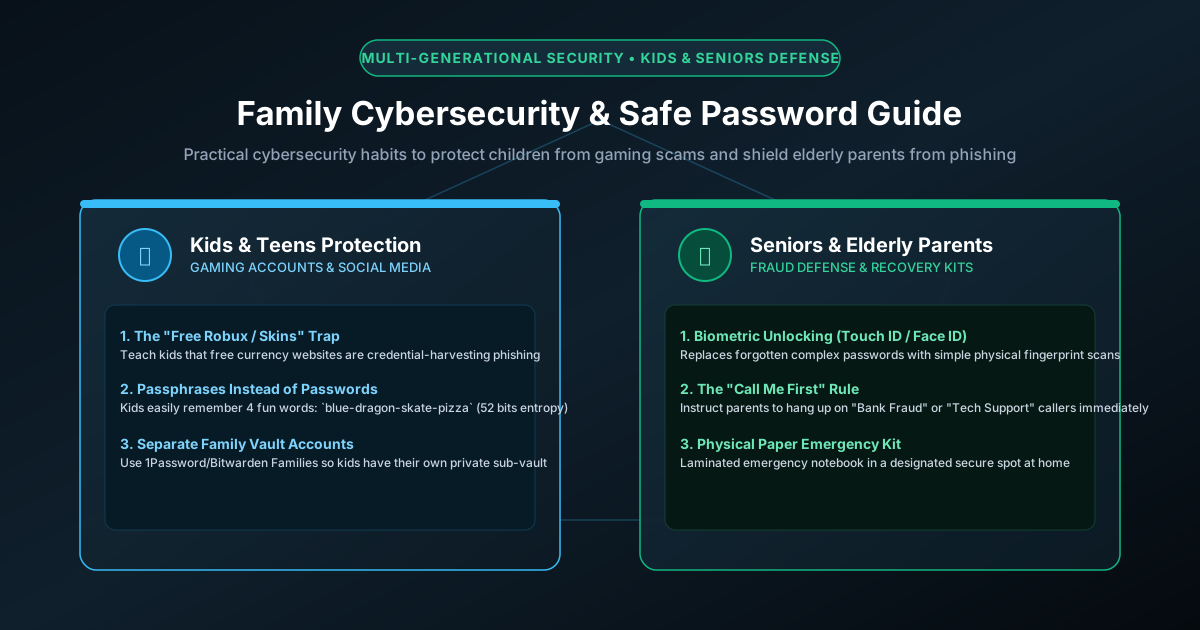
Figure 1.1: Multi-generational home cybersecurity defense protecting children, parents, and seniors.
Quick Answer: Protecting a household from modern cyber threats requires a tailored, empathetic multi-generational approach. Children are prime targets for gaming credential theft (Discord phishing, fake Roblox "free Robux" generators, and Minecraft mod stealers), while seniors are targeted by tech support scams and urgency-driven SMS banking fraud. A robust family defense starts with adopting a Family Password Manager (such as 1Password Families or Bitwarden Families) with shared and private vaults, teaching children 4-word mnemonic passphrases, enabling biometric passkeys on seniors' devices, filtering home Wi-Fi traffic with security-focused DNS (NextDNS or Cloudflare Family), and storing an Emergency Vault Succession Kit in a fireproof home safe.
Generational Threat Vectors: Why One Rule Doesn't Fit All
Each generation in a connected household interacts with digital services differently and faces distinct psychological attack vectors:
- Children & Teenagers (Ages 7–17): Highly active on Discord, Roblox, Steam, and TikTok. Attackers exploit their desire for in-game currency, rare skins, and game cheats to deliver browser infostealers or trick them into sharing login credentials. Young users also frequently share accounts with schoolmates.
- Working Adults (Ages 18–64): Juggle personal banking, healthcare, smart home devices, and work-from-home corporate VPNs. Vulnerable to credential reuse across compromised subscription services and calendar/email phishing lures.
- Senior Grandparents (Ages 65+): Frequently suffer from "password fatigue" and anxiety over forgotten credentials, leading to dangerous workarounds like writing passwords on monitor sticky notes. Highly vulnerable to fake antivirus popup warnings ("Your PC has 5 viruses! Call Microsoft support") and urgent SMS bank impersonation alerts.
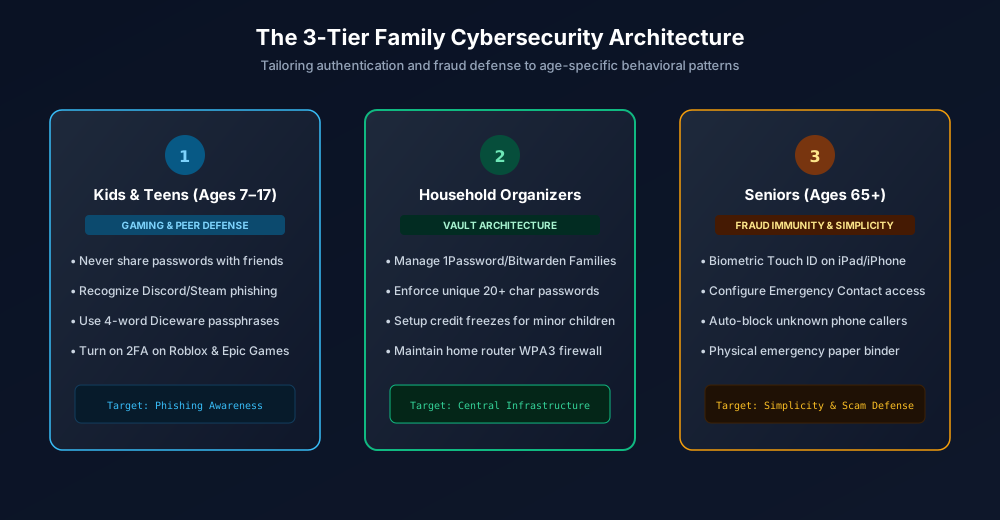
Figure 1.2: The 3-tier family cybersecurity framework for kids, parents, and seniors.
The 5-Pillar Family Cybersecurity Defense Checklist
| Household Member | Primary Risk Vector | Recommended Security Solution | Actionable Setup Step |
|---|---|---|---|
| Kids & Teens | Gaming infostealers, Discord scams, password sharing | Mnemonic passphrases + Monitored 2FA | Generate 4-word Diceware stories; bind parent email for 2FA verification. |
| Working Parents | Credential stuffing, spear phishing, credential sprawl | Family Password Manager Vaults | Separate shared household logins (Netflix, utilities) from private work/bank vaults. |
| Senior Grandparents | Tech support popups, forgotten passwords, SMS smishing | Biometric Passkeys + Ad Blocker DNS | Enroll Touch ID / Face ID passkeys; install uBlock Origin and NextDNS. |
| Entire Household | Compromised Wi-Fi router, malicious ads, malware | Router DNS Filtering + Safe Storage | Set router DNS to 1.1.1.3; place master recovery envelope in a fireproof safe. |
Teaching Children Safe Habits: The Passphrase Game
Children struggle to memorize complex passwords containing random symbols and numbers like Tr#mQ2!, leading them to reuse simple names or birthdates across every account. Instead, teach them the Passphrase Story Method using our Passphrase Generator:
- Pick four completely unrelated, vibrant words:
purple dinosaur skates ocean. - Have your child imagine a fun mental picture of that scene. Stories and vivid imagery stick in memory effortlessly.
- Explain why passwords are like toothbrushes: You never share them with your best friends at school, and you replace them if something feels dirty or suspicious.
- Ensure that in-game purchases and email password resets require parent authorization using our PIN Generator for parental controls.
Empowering Seniors: Banishing Password Anxiety with Passkeys
For elderly parents and grandparents, the constant cycle of typing complex passwords, forgetting them, and resetting them causes acute frustration and makes them vulnerable to social engineering. The definitive solution in 2026 is passkeys and biometric authentication:
- Setup Touch ID or Face ID: Configure biometric sensors on their iPad, iPhone, or Windows Hello laptop so logging into their primary email or bank requires only a fingerprint or face scan.
- Eliminate Phishing Links via Origin Binding: Because passkeys are cryptographically bound to legitimate websites (as explained in our passkey security analysis), a senior cannot accidentally type their credentials into a counterfeit phishing site.
- Network-Level Ad and Malware Blocking: Install a reputable ad blocker (uBlock Origin) and configure their device or home router DNS to Cloudflare 1.1.1.3 (Malware + Adult Blocking) or NextDNS. This completely prevents scam tech-support popups from appearing on their screen.
Household Infrastructure: Securing the Router & Emergency Access
Even the strongest device passwords fail if your home network router is compromised. Ensure your household network adheres to fundamental security standards:
- Change Default Router Credentials: Replace factory admin credentials immediately following our router hardening guide.
- Create an Isolated IoT Guest Network: Put smart TVs, robot vacuums, gaming consoles, and smart speakers on a dedicated Wi-Fi guest network separated from family laptops and phones.
- Prepare a Physical Emergency Access Envelope: Configure emergency vault succession in your password manager (see our emergency access succession tutorial) and keep a physical paper backup sealed in a fireproof home safe.
Schedule an Annual Family Cyber Fire Drill
Once per year (such as during New Year's or Cybersecurity Awareness Month), spend one hour conducting a family security health check:
- Verify that all family smartphones, tablets, and laptops have automatic OS updates enabled.
- Check family email addresses against breach repositories using our tips in digital footprint cleanup.
- Audit shared family streaming and utility logins, pruning accounts no longer in use.
- Confirm that the physical emergency backup envelope is intact and up to date.
Frequently Asked Questions
What is the best password manager for non-tech-savvy family members?
1Password Families and Bitwarden Families are the gold standards. Both provide an easy family organizer portal where parents can manage shared vaults (for household Wi-Fi, streaming, utilities) while maintaining completely private vaults for individual members, backed by seamless biometric unlocking.
How can I stop my kids from sharing gaming passwords with friends?
Educate children that gaming accounts carry real monetary and emotional value. Explain that even trustworthy friends might have malware on their computers that steals saved logins. Pair their accounts with parental 2FA verification so that new logins require adult confirmation.
How should elderly parents store their master passwords safely?
Do not allow master passwords to be written on sticky notes attached to monitors. Instead, enroll their biometric sensors (Touch ID / Face ID) for daily unlocking and store a physical Emergency Kit with their master passphrase sealed inside a fireproof home safe alongside legal documents.
Does network DNS filtering replace device password managers?
No. Network DNS filtering (such as NextDNS or Cloudflare 1.1.1.3) acts as a high-performance first filter that blocks malicious phishing domains and deceptive ad networks before they reach a device, but it must be combined with strong unique passwords, password managers, and 2FA.
Related password security guides
Best Password Practices for Small Businesses
A practical small business password safety guide covering password managers, MFA, shared accounts, staff changes, and admin access.
Bulk Password Generator Risks
Learn when bulk password generation is useful, when it creates risk, and how teams should handle many new passwords safely.
Business Password Safety Checklist
Use this practical password safety checklist to protect business email, admin accounts, cloud tools, freelancers, and shared access.
The tools work without analytics. Optional cookies help us understand page visits; passwords and form values are never collected.