
Emergency Access in Password Managers: How to Set Up Vault Succession for Family
Build a compliant 2026 small business password policy with NIST length rules, password manager rollout steps, and MFA enforcement checklists.
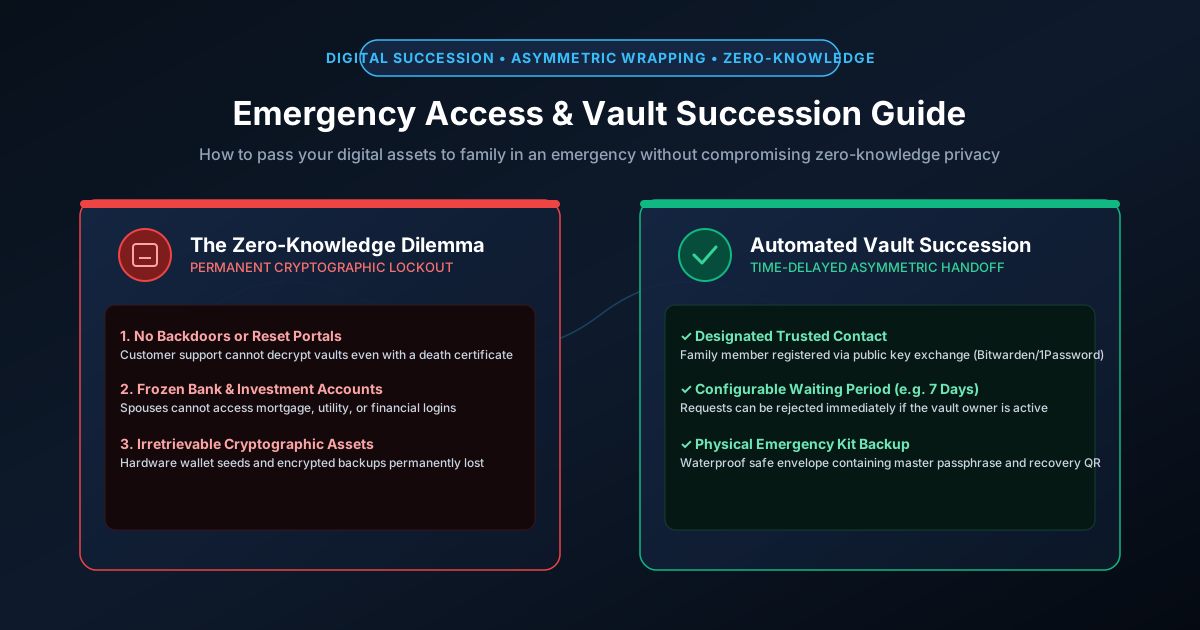
Figure 2.1: Digital inheritance: Preserving zero-knowledge privacy while ensuring family recovery access.
Quick Answer: Because modern password managers utilize true zero-knowledge end-to-end encryption, customer support cannot decrypt your vault or recover credentials for your heirs—even if presented with a certified death certificate or court order. If you become incapacitated or pass away without a configured digital succession plan, your online banking, cryptocurrency wallets, email accounts, and family memories are permanently locked. Implementing a robust vault succession plan requires two complementary layers: (1) Automated asymmetric emergency access (available in Bitwarden and 1Password) with a multi-day waiting period, and (2) A physical offline Emergency Kit sealed in a fireproof safe.
The Zero-Knowledge Dilemma: Why Support Cannot Help
As detailed in our guide on how zero-knowledge encryption protects vaults, commercial password managers never store your master password or unencrypted decryption keys. Your vault is encrypted locally on your workstation using AES-256-GCM and stretched via Argon2id or PBKDF2.
This mathematical architecture provides absolute protection against server breaches, but it creates a catastrophic failure point when a vault owner becomes incapacitated. Traditional legal probate courts have no jurisdiction over cryptographic key spaces: if the master passphrase is lost, the data is mathematically destroyed.
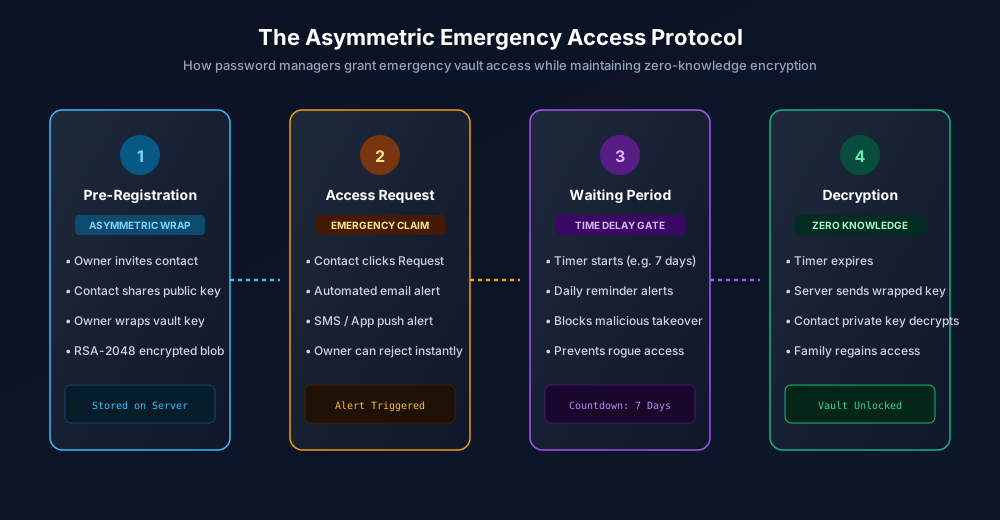
Figure 2.2: The Asymmetric Emergency Access Protocol: Zero-knowledge mathematical vault succession.
How Modern Emergency Access Works Cryptographically
Modern password managers solve the dilemma using public-key asymmetric cryptography. Here is how platforms like Bitwarden implement emergency access without learning your secrets:
- Pre-Registration Key Exchange: When you designate an emergency contact (such as a spouse or adult child), they must have a Bitwarden account. Your vault client downloads the contact's public key.
- Asymmetric Key Wrapping: Your device encrypts a copy of your vault's symmetric Master Key using the contact's public key (RSA-2048). This encrypted blob is uploaded to the cloud server. The server cannot read it; only the contact's private key can decrypt it.
- The Emergency Claim: If disaster strikes, your contact logs into their account and clicks "Request Emergency Access".
- The Time-Delay Waiting Period: The server immediately sends urgent notifications via email and mobile push to the vault owner. A countdown timer begins (configurable between 2 to 14 days).
- Automatic Unlocking: If you are alive and well, you tap Reject in your app, canceling the request immediately. If you are incapacitated and the waiting period expires without response, the server delivers the wrapped key blob to your contact. Their device decrypts your Master Key using their private key, granting access.
Comparison: Emergency Access Mechanisms Across Major Managers
| Password Manager | Native Emergency Access | Mechanism | Configurable Wait Period | Offline Physical Kit Required |
|---|---|---|---|---|
| Bitwarden (Premium / Families) | Yes (Built-in) | Asymmetric RSA public-key wrapping | 1 to 90 days (7 days recommended) | Optional but strongly recommended |
| 1Password (Families) | Family Organizer Recovery | Family Organizer resets account keys | Instant (Manual approval by organizer) | Mandatory (1Password Emergency Kit PDF) |
| KeePassXC (Offline) | No (100% Offline) | Manual backup & key-file sharing | N/A (No servers) | Mandatory (.kdbx + key file on USB) |
| Apple Passwords / iCloud | Legacy Contact | Apple Legacy Contact Access Key | Requires death certificate review | Print access key QR code |
The 4-Step Practical Vault Succession Checklist
- Configure In-App Emergency Contacts:
- In Bitwarden: Open web vault > Settings > Emergency Access > Invite your trusted family member with "Takeover" or "View" permission. Set the waiting period to 7 days.
- In Apple iCloud: Open Settings > Apple ID > Sign-In & Security > Legacy Contact > Add your spouse or child and print the generated access key.
- Assemble a Physical Emergency Envelope: Print a physical paper kit containing:
- Your master password (generated with our Passphrase Generator)
- Your 1Password 34-character Secret Key or Bitwarden 2FA recovery code
- Workstation screen unlock PINs and full-disk recovery keys (BitLocker / FileVault)
- Smartphone lock codes and SIM card PUK codes
- Seal and Secure the Document: Place the documents inside a tamper-evident, waterproof envelope. Store the envelope in a UL-listed fireproof home safe or with your estate attorney alongside your legal will.
- Schedule an Annual "Fire Drill": Every year, review the emergency kit with your trusted family contact. Verify that master passphrases have not changed and ensure that hardware keys or recovery codes remain fully operational.
For related family security guides, explore our tutorial on setting up offline vaults with KeePassXC and our guide on preventing SIM-swapping.
Frequently Asked Questions
Can an emergency contact peek into my passwords while I am alive?
No. If an emergency contact initiates a request, you immediately receive mobile alerts and emails. You can tap "Reject" to cancel the attempt. Access is ONLY granted if you fail to respond before the waiting period (e.g., 7 days) expires.
What is the ideal waiting period for emergency access?
A 7-day waiting period is the industry-recommended sweet spot. A 24-hour window is too short (you might be on an international flight or off-grid camping trip and miss the alert), while a 30-day window is too long for family members dealing with urgent mortgage or funeral logistics.
What happens to my emergency access if my contact loses their password?
If your designated contact forgets their own password or loses access to their account, they cannot decrypt your emergency key. You should periodically verify that your contact maintains active, working access to their account, or designate a secondary trusted contact.
Does a legal will give my family access to my password manager?
A legal will grants legal ownership of your digital assets, but it cannot override cryptographic mathematics. If the zero-knowledge master password is unknown, no judge or court order can compel the password manager to decrypt the vault. A physical Emergency Kit or configured emergency access is mandatory.
Related password security guides
Best Password Practices for Small Businesses
A practical small business password safety guide covering password managers, MFA, shared accounts, staff changes, and admin access.
Bulk Password Generator Risks
Learn when bulk password generation is useful, when it creates risk, and how teams should handle many new passwords safely.
Business Password Safety Checklist
Use this practical password safety checklist to protect business email, admin accounts, cloud tools, freelancers, and shared access.
The tools work without analytics. Optional cookies help us understand page visits; passwords and form values are never collected.