
KeePassXC Complete Setup Guide: Offline Password Management for Privacy Advocates
Build a compliant 2026 small business password policy with NIST length rules, password manager rollout steps, and MFA enforcement checklists.
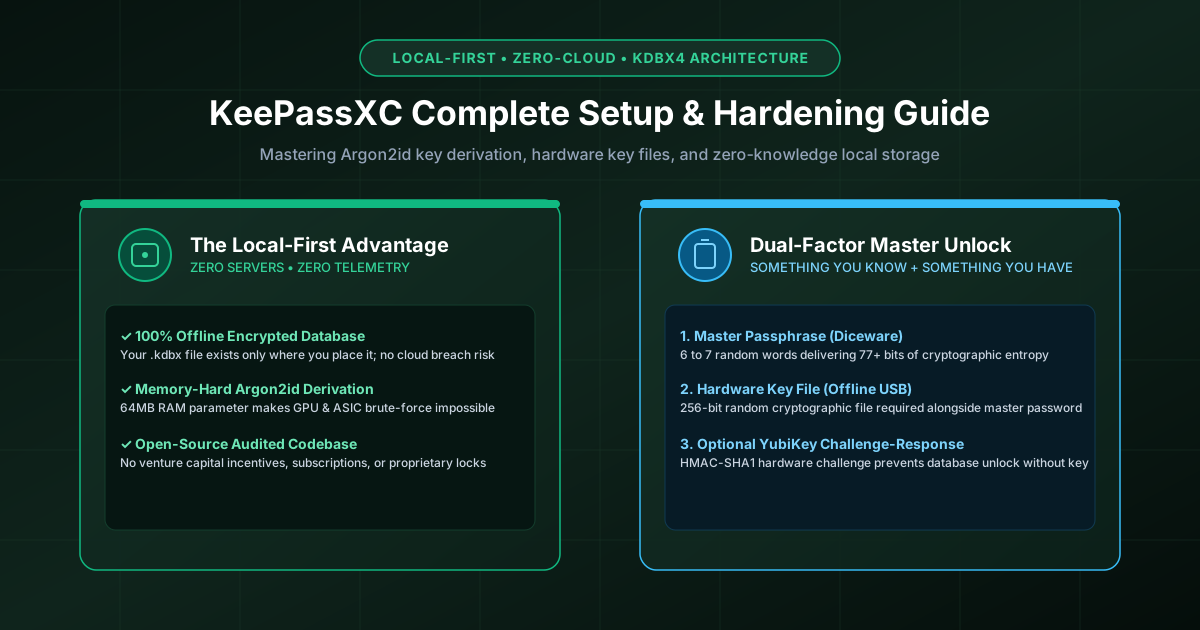
Figure 2.1: KeePassXC local-first password architecture: Zero cloud dependency with hardware key file protection.
Quick Answer: KeePassXC is a free, open-source, offline password manager that stores all your credentials in an encrypted .kdbx database file stored strictly on your local disk. Unlike cloud-based managers (1Password, Bitwarden, Dashlane), KeePassXC connects to no remote servers, collects zero telemetry, and charges no subscriptions. By configuring Argon2id memory-hard key derivation and pairing a strong Diceware master passphrase with an offline hardware key file, you create a cryptographic vault that is mathematically impervious to cloud server breaches and brute-force GPU attacks.
Why Privacy Advocates Choose Local `.kdbx` Over Cloud Vaults
While modern cloud password managers use audited zero-knowledge architectures (as explored in our self-hosted vs cloud comparison), they still introduce systemic risks:
- Cloud Breach Targets: Centralized cloud password vaults are high-value targets for nation-state threat actors. A breach of a cloud provider's infrastructure exposes encrypted customer blobs for offline cracking.
- Service Outages & Lockouts: If a cloud vendor suffers a multi-hour DNS outage, DDoS attack, or account suspension, you cannot access your passwords.
- Corporate Governance Changes: Commercial password managers can alter subscription terms, change privacy policies, or introduce closed-source dependencies at any time.
KeePassXC operates on a zero-trust, local-first model. The code is 100% open source (GPL-3.0), community-audited, and cross-platform (Windows, macOS, Linux). Your database is a single portable file that you own, control, and backup independently.
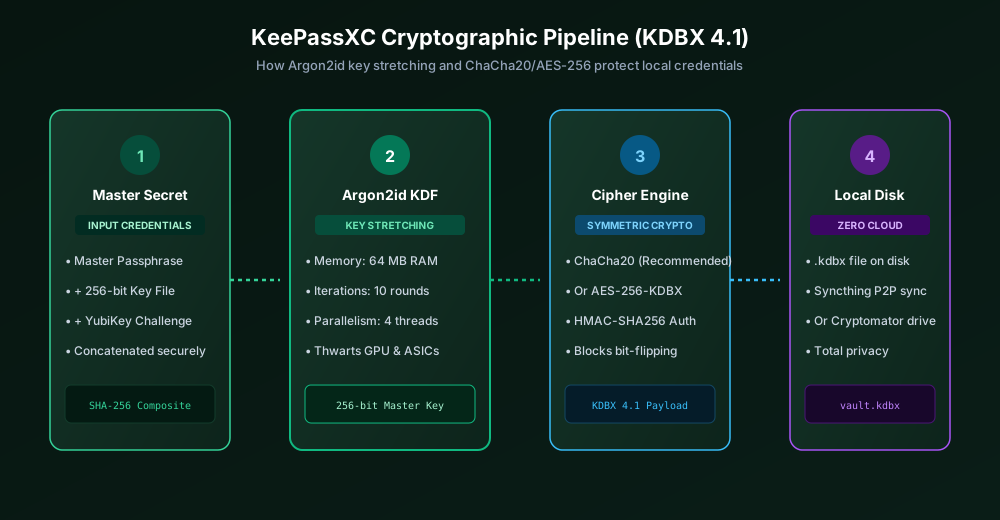
Figure 2.2: KeePassXC KDBX4 cryptographic pipeline: Composite keys stretched via Argon2id into ChaCha20/AES.
Optimal Database Encryption Settings (KDBX 4.1)
When creating a new database in KeePassXC, navigate to Database > Database Settings > Security. Ensure you configure the industry-standard cryptographic parameters:
| Setting / Parameter | Default Value | Recommended Hardened Value | Cryptographic Benefit |
|---|---|---|---|
| Database Format | KDBX 4 | KDBX 4.1 | HMAC-SHA256 authenticated chunks; prevents bit-flipping |
| Key Derivation (KDF) | Argon2id | Argon2id | Memory-hard password hashing; immune to GPU/ASIC clusters |
| Argon2 Memory Usage | 64 MB | 128 MB or 256 MB | Forces crackers to dedicate massive RAM per attempt |
| Argon2 Transform Rounds | 10 rounds | 10 to 15 rounds | Enforces ~1.0 second decryption delay on local CPU |
| Encryption Algorithm | AES-256 | ChaCha20 or AES-256 | High performance on CPUs without hardware AES-NI instructions |
Step-by-Step: Creating a High-Security KeePassXC Database
Step 1: Generate a Diceware Master Passphrase
Because KeePassXC has no password reset button, your master passphrase is your sole defense. Do not use an arbitrary 10-character password. Follow NIST guidelines and generate a 6-word Diceware passphrase delivering over 77 bits of entropy (e.g., cascade-monument-falcon-prairie-cobalt-summit).
Generate your master phrase with our offline, client-side Passphrase Generator and test its resistance with our Password Strength Checker.
Step 2: Generate and Secure a Key File
A Key File acts as a physical second factor. It is a 256-bit file containing cryptographically random noise. To unlock your database, KeePassXC requires BOTH your master passphrase AND the key file:
- In the database creation wizard, check Key File and click Generate.
- Save the key file (e.g.,
database.key) onto a dedicated, encrypted USB drive or separate physical storage device. - Critical Security Rule: Never store your
.kdbxdatabase file and your.keyfile in the exact same directory or cloud sync folder. Keeping them separate ensures that an adversary who steals your database file still cannot open it without physical access to your key file.
Step 3: Enable Secure Browser Integration
KeePassXC provides an official browser extension (available for Chrome, Firefox, Brave, and Edge) that allows seamless auto-fill without compromising offline security. It communicates with the desktop application via encrypted Unix domain sockets or Windows named pipes:
- In KeePassXC, open Tools > Settings > Browser Integration.
- Check "Enable browser integration" and check your preferred browsers.
- Install the KeePassXC-Browser extension from your browser's official store.
- Click the extension icon and click Connect. Enter a unique connection name in KeePassXC to establish an authenticated cryptographic key exchange between browser and vault.
How to Sync KeePassXC Safely Across Devices
Because KeePassXC is offline, syncing across your laptop, desktop, and mobile phone (using KeePassDX on Android or Strongbox on iOS) requires choosing a privacy-respecting sync strategy:
- Syncthing (Recommended — Zero Cloud): Syncthing is an open-source, peer-to-peer file synchronization utility. It synchronizes your
.kdbxdirectly over your home Wi-Fi or encrypted TLS tunnels between your devices without any intermediary server. - Cryptomator Encrypted Cloud Sync: If you prefer using cloud storage (Google Drive, Dropbox, Nextcloud), wrap your cloud folder with Cryptomator first. Cryptomator encrypts your
.kdbxfile client-side before it touches Google or Microsoft servers, providing defense-in-depth against cloud surveillance. - KeePassXC Built-In Conflict Resolution: If two devices edit passwords simultaneously, KeePassXC automatically detects file modification timestamps and merges entries cleanly into a conflict group rather than overwriting data.
For more foundational security tips, explore our guides on zero-knowledge encryption architecture and API key and token management.
Frequently Asked Questions
What happens if I lose my KeePassXC master passphrase or key file?
If you lose your master passphrase or key file, your database is permanently inaccessible. KeePassXC utilizes military-grade symmetric encryption (AES-256 or ChaCha20 with Argon2id). There are no master keys, backdoor recovery mechanisms, or support desks capable of decrypting your data.
Can infostealer malware dump my KeePassXC passwords from memory?
KeePassXC incorporates memory protection features that zero out sensitive plaintext from RAM when the database is locked or when entries are copied to the clipboard. However, if your system is actively infected with root/kernel malware while the database is unlocked, no software can be 100% safe. Always lock your vault when walking away.
How can I access my KeePassXC database on my iPhone or Android phone?
Because KeePassXC uses the standardized open-source .kdbx format, you can open your vault on iOS using Strongbox or KeePassium, and on Android using KeePassDX. All these apps support Argon2id, key files, and biometric unlocking.
Is KeePassXC safer than 1Password or Bitwarden?
KeePassXC provides superior privacy and immunity to cloud-scale server compromises because your vault never touches an external server. However, commercial cloud managers offer more seamless multi-user sharing and automated cloud backups. For individual privacy advocates and technical professionals, KeePassXC represents the gold standard of local control.
Related password security guides
Best Password Practices for Small Businesses
A practical small business password safety guide covering password managers, MFA, shared accounts, staff changes, and admin access.
Bulk Password Generator Risks
Learn when bulk password generation is useful, when it creates risk, and how teams should handle many new passwords safely.
Business Password Safety Checklist
Use this practical password safety checklist to protect business email, admin accounts, cloud tools, freelancers, and shared access.
The tools work without analytics. Optional cookies help us understand page visits; passwords and form values are never collected.