
API Key vs. Token vs. Password: Best Practices for Developers and DevOps
Build a compliant 2026 small business password policy with NIST length rules, password manager rollout steps, and MFA enforcement checklists.
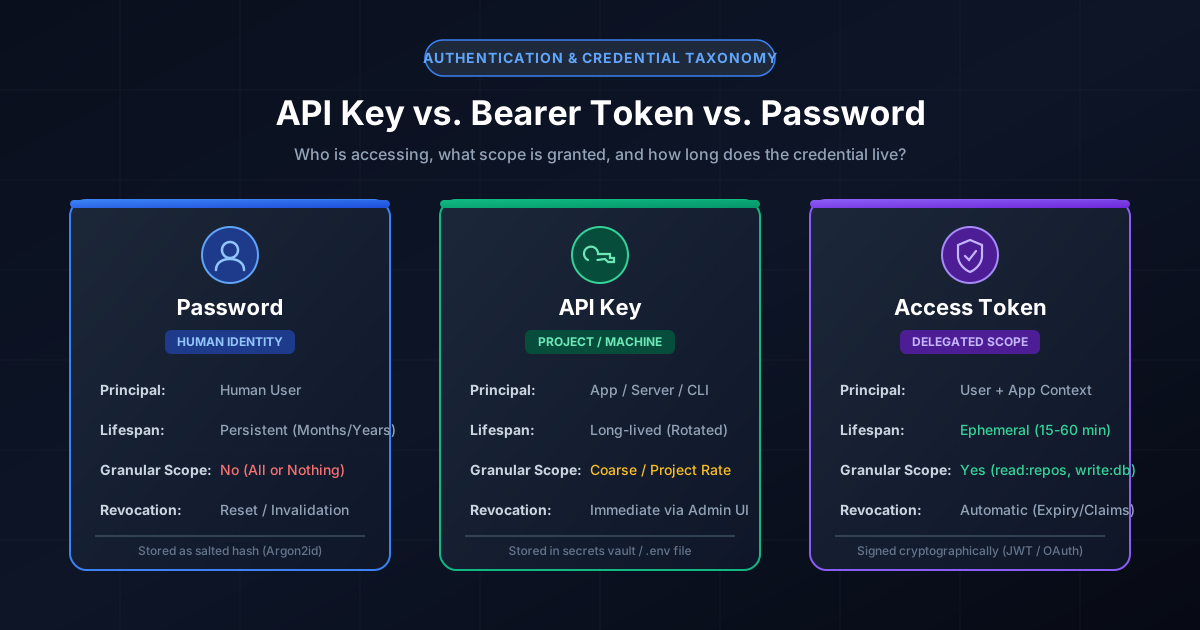
Figure 1.1: Authentication credentials categorized by principal identity, lifespan, and privilege scope.
Quick Answer: A password authenticates a human identity to establish a session; an API key authenticates a machine, application, or project to access backend APIs; and an access token (such as a JWT or OAuth 2.0 bearer token) provides temporary, cryptographically signed authorization with granular permission scopes (e.g. read:users) on behalf of a specific identity.
Core Definitions: Deconstructing Credentials by Purpose
In modern software engineering and cloud operations, developers frequently conflate passwords, API keys, and bearer tokens. Using the wrong credential type in the wrong architectural layer is one of the leading causes of critical data breaches, account takeovers, and uncontrolled cloud billing spikes.
1. Passwords (Human Authentication)
A password is a secret string known only to a human user and the authentication service. Its primary purpose is authentication: answering the question, "Who is trying to log in?"
- Principal: A human end-user.
- Lifespan: Long-lived (months or years until rotated or replaced).
- Storage on Server: Never stored in plaintext; stored as an irreversible cryptographic hash with a unique salt using memory-hard functions like Argon2id or bcrypt.
- Limitation: All-or-nothing access. If a password is compromised, the attacker has unrestricted access to everything the human user can do.
2. API Keys (Machine and Project Identification)
An API key is a long, opaque alphanumeric string assigned to a client application, automated script, microservice, or CI/CD pipeline. Its primary role is project identification and traffic routing.
- Principal: An application, server, or software system.
- Lifespan: Persistent (often static until an administrator explicitly revokes or rotates it).
- Typical Uses: Rate limiting, API usage metering, project quota enforcement, and identifying software clients in service-to-service calls.
- Limitation: Poor user context. An API key proves that the caller has access to the project, but does not identify which individual user triggered the action.
3. Access Tokens (Granular Delegated Authorization)
An access token (most commonly implemented as an OAuth 2.0 Bearer Token or JSON Web Token / JWT) is an ephemeral artifact that proves the caller has been granted permission to perform specific actions on specific resources.
- Principal: A client application acting on behalf of an authenticated user.
- Lifespan: Ephemeral (typically 15 to 60 minutes), refreshed using a tightly guarded refresh token.
- Scoping: Highly granular Role-Based Access Control (RBAC). A token might grant
repo:readbut strictly denyrepo:deleteorbilling:admin. - Cryptographic Architecture: Self-contained JWTs are digitally signed with an asymmetric private key (e.g. RS256 or ES256). Resource servers can verify the token's validity and claims offline using the issuer's public key without querying a central database.
Comprehensive Comparison Matrix: Passwords vs. API Keys vs. Access Tokens
| Architectural Feature | Password | API Key | Access Token (OAuth / JWT) |
|---|---|---|---|
| Primary Purpose | User Authentication | Project / App Identification | Scoped Resource Authorization |
| Lifespan | Months / Years | Long-lived (Requires rotation) | Short-lived (15–60 minutes) |
| Granular Scopes (RBAC) | × None (All-or-nothing) | Coarse (Per-project or service) | ✓ Granular (Action + Resource) |
| Recommended Storage | User Memory / Vault | Server Env / Secrets Vault | In-Memory / HTTP-Only Cookie |
| Backend Verification | Argon2id Hash Comparison | Database Index / HMAC Lookup | Asymmetric Signature (RS256/ES256) |
| Entropy Requirement | 70+ bits (16+ chars) | 128+ bits (CSPRNG) | 256+ bits cryptographic signature |
| Impact if Leaked | Full Account Takeover | Service Impersonation & Quota Drain | Limited to token scope & TTL |

Figure 1.2: End-to-end secrets lifecycle management for production development environments.
Why Exposing Secrets in Git Repositories Happens (and How to Prevent It)
According to cybersecurity telemetry reports, over 10 million distinct API keys, database connection strings, and private tokens are accidentally committed to public and private Git repositories every year. Automated botnets continuously monitor the GitHub public event stream (the /events API) and clone commits within under 3 seconds of being pushed, immediately attempting to provision cryptocurrency miners or access AWS S3 buckets.
The 3 Anti-Patterns That Lead to Leaks
- Hardcoding for Local Testing: Writing
const API_KEY = "sk_live_98f2...";with the intention of deleting it before pushing, but accidentally staging it withgit add .. - Committing
.envFiles: Forgetting to list.env,.env.local, and*.pemin the repository's root.gitignorefile. - Secret Sprawl in Docker Images: Passing API keys via Docker build arguments (
ARG SECRET_KEY), which embeds the secret into intermediate image layers that can be inspected viadocker history.
Enforcing Pre-Commit Hooks and Secrets Scanning
To guarantee that secrets never leave your workstation, implement automated client-side pre-commit hooks using tools like Gitleaks or TruffleHog. Add the following hook to your .pre-commit-config.yaml:
repos:
  - repo: https://github.com/gitleaks/gitleaks
    rev: v8.18.0
    hooks:
      - id: gitleaks
Cryptographic Requirements: Why High-Entropy Random Keys Defeat Offline Attacks
When an application generates an API key or session token, the quality of its randomness determines its resistance to brute-force attacks and timing analysis.
Never generate API keys or security tokens with Math.random(). In JavaScript and Node.js, Math.random() uses the xoshiro128+ pseudo-random number generator (PRNG). By observing just a few generated outputs, an attacker can reconstruct the internal PRNG state and accurately predict all future or past tokens.
Always use a hardware-backed Cryptographically Secure Pseudo-Random Number Generator (CSPRNG):
- Node.js:
crypto.randomBytes(32).toString('hex')(produces 256 bits of Shannon entropy). - Browser Web Crypto:
window.crypto.getRandomValues(new Uint8Array(32)). - Python:
secrets.token_urlsafe(32).
For administrative cloud secrets and database service accounts, generate high-entropy strings using our 24-Character Password Generator (157.3 bits of entropy) or calculate raw cryptographic hashes directly in your browser with our Client-Side SHA-256 Hash Generator.
Secure Architecture: Where to Store Secrets at Rest and Runtime
Follow the Principle of Least Privilege and zero-trust credential storage across every tier of your infrastructure:
1. Client-Side Single Page Apps (React, Vue, iOS, Android)
Never place private API keys or database passwords in client-side code. Any secret embedded in a compiled JavaScript bundle, APK, or iOS IPA binary can be extracted within minutes using simple string inspection (strings bundle.js | grep -i api_key) or browser developer tools. Client applications should only hold short-lived access tokens received through an authenticated OAuth flow.
2. Backend Server Environments
Inject secrets into production containers at runtime through environment variables sourced from a dedicated Secrets Management Service:
- HashiCorp Vault: Provides dynamic secret generation with lease times and instant revocation.
- AWS Secrets Manager / GCP Secret Manager: Automatically rotates database passwords on a 30-day schedule without application downtime.
- Kubernetes Secrets: Always encrypt Kubernetes secrets at rest in etcd using KMS envelope encryption.
Preventing Constant-Time Leaks: Comparing Secrets Safely
When verifying an API key on your backend server, standard string comparison (if (apiKey === storedKey)) introduces a timing attack vulnerability. Standard string comparisons exit early on the first mismatched byte, allowing an attacker with precise network measurements to guess the key byte-by-byte.
Always use a constant-time comparison algorithm, such as Node's built-in crypto.timingSafeEqual(Buffer.from(a), Buffer.from(b)).
Frequently asked questions
What is the main difference between an API key and a token?
An API key identifies a specific project, application, or software caller for routing, billing, and rate-limiting purposes, whereas a token (like a JWT or OAuth bearer token) proves authorized access to specific resources with fine-grained scopes (e.g. read-only) on behalf of an authenticated user for a short duration.
Can I put an API key in a React or mobile application?
No. Any API key embedded in a front-end client (React, Vue, mobile apps) can be trivially extracted by anyone inspecting network traffic or decompiling the client bundle. Only public keys (like Google Maps client keys with strict HTTP referrer restrictions) belong on the frontend; private API keys must reside solely on your backend server.
How often should API keys and developer secrets be rotated?
Industry security standards (including NIST SP 800-63B and PCI DSS 4.0) recommend rotating long-lived API keys every 90 days, or immediately upon suspecting any exposure. Using automated secrets managers (like AWS Secrets Manager or HashiCorp Vault) enables zero-downtime dual-key rotation.
Why is Math.random() insecure for generating tokens and keys?
Math.random() uses a predictable pseudo-random algorithm that is not cryptographically secure. An attacker who captures a few generated values can determine the internal PRNG state and mathematically deduce previous and subsequent keys. Always use hardware CSPRNGs like crypto.getRandomValues() or Node crypto.randomBytes().
Related password security guides
Best Password Practices for Small Businesses
A practical small business password safety guide covering password managers, MFA, shared accounts, staff changes, and admin access.
Bulk Password Generator Risks
Learn when bulk password generation is useful, when it creates risk, and how teams should handle many new passwords safely.
Business Password Safety Checklist
Use this practical password safety checklist to protect business email, admin accounts, cloud tools, freelancers, and shared access.
The tools work without analytics. Optional cookies help us understand page visits; passwords and form values are never collected.