
BitLocker and FileVault Recovery Keys: How to Create and Store Master Passphrases
Build a compliant 2026 small business password policy with NIST length rules, password manager rollout steps, and MFA enforcement checklists.
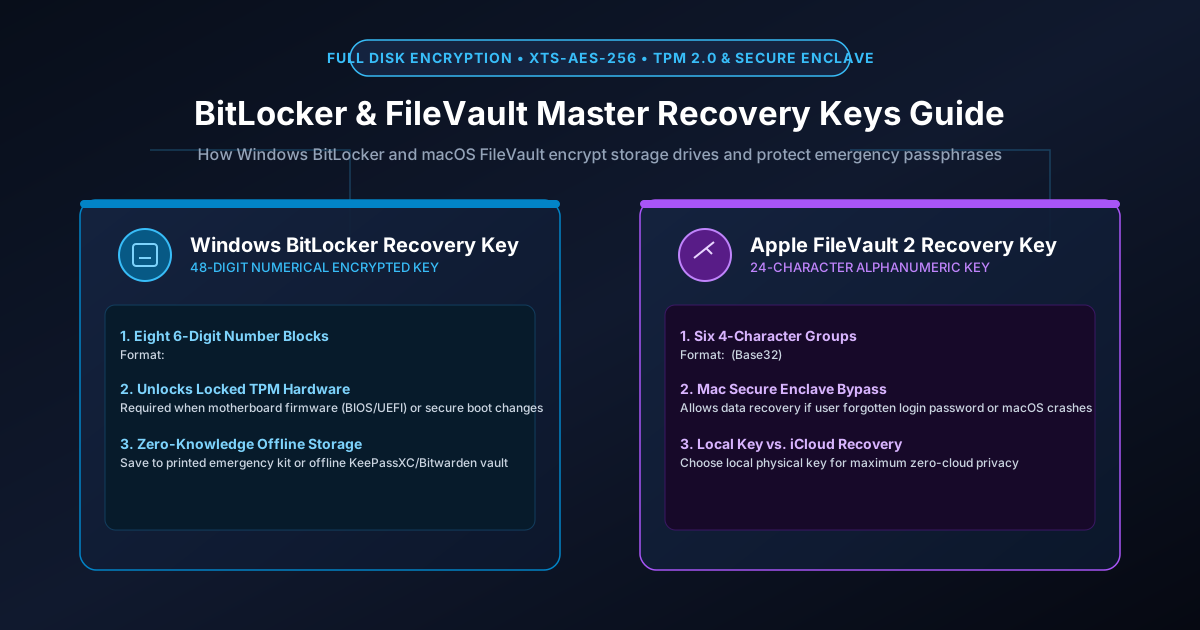
Figure 2.1: Full-Disk Encryption: BitLocker 48-digit numeric keys vs. FileVault 24-character alphanumeric master recovery passphrases.
Quick Answer: BitLocker (Windows) and FileVault 2 (macOS) provide hardware-backed Full Disk Encryption (FDE) using XTS-AES-256 to ensure that if your laptop is stolen or its drive is physically removed, the data cannot be read without cryptographic keys. When your computer's TPM chip triggers a security lockout (due to firmware updates, hardware alterations, or forgotten passwords), your sole lifeline is the Master Recovery Key: a 48-digit numerical password on Windows or a 24-character alphanumeric passphrase on Mac. Backing up these recovery keys to an offline physical kit or encrypted zero-knowledge vault is essential to prevent permanent, catastrophic data loss.
How Full Disk Encryption Works Under the Hood
When you enable encryption on Windows or macOS, every byte written to your solid-state drive (SSD) is encrypted in real time at the physical block level. The system uses a two-tier cryptographic hierarchy:
- Full Volume Encryption Key (FVEK): A 256-bit symmetric AES key that encrypts all sector data on the drive. The FVEK never changes unless the entire drive is reformatted.
- Volume Master Key (VMK): The FVEK is encrypted by the Volume Master Key. During normal operation, the VMK is sealed inside your computer's hardware security chip: the TPM 2.0 (Trusted Platform Module) on Windows PCs, or the Apple Silicon Secure Enclave (T2 / M-series chips) on Mac.
- The Recovery Key Lifeline: If the motherboard firmware changes, if Secure Boot is tampered with, or if the hardware fails, the TPM refuses to release the VMK. The operating system halts and prompts for the Master Recovery Key, which contains a cryptographically wrapped copy of the VMK capable of unsealing the drive.
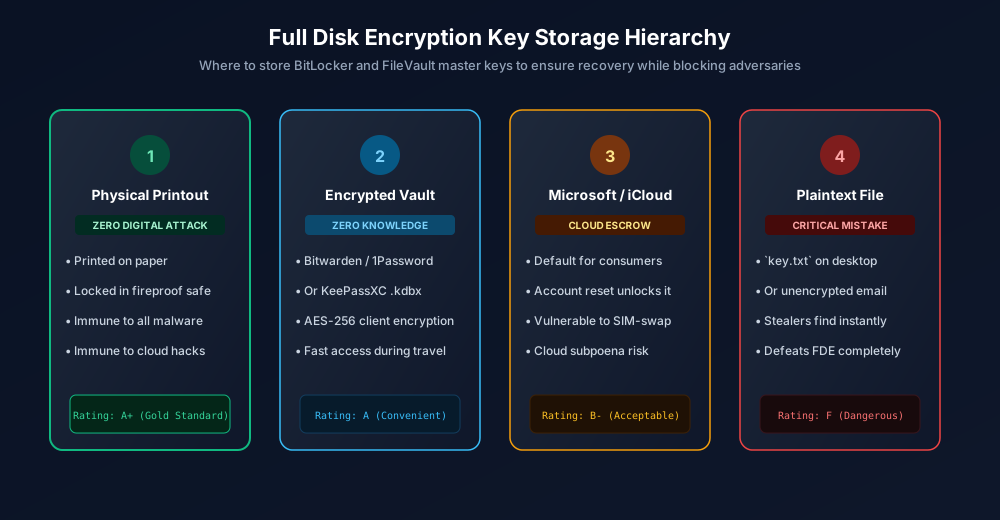
Figure 2.2: The Full-Disk Encryption Recovery Key Storage Hierarchy: From physical air-gapped kits to cloud escrows.
Windows BitLocker: Managing the 48-Digit Numeric Key
BitLocker recovery keys consist of 48 digits split into eight 6-digit blocks separated by hyphens:
# Example BitLocker 48-Digit Recovery Key Structure
419283-091823-749201-829104-582910-192837-481920-391827
Recovery Key ID: 3C49F12A-98B2-4E11-9F10-238A4B821C09
The 48 digits are not an arbitrary random number; they represent a 128-bit cryptographic key encoded as eight 16-bit integers with mathematical checksums. If you mistype a single digit on the blue BitLocker recovery screen, the system immediately alerts you to the error.
How to Check and Backup Your BitLocker Key via Terminal
Open an elevated Administrator PowerShell prompt and execute:
# Query active BitLocker volumes and display recovery password
$ (Get-BitLockerVolume -MountPoint C:).KeyProtector | Where-Object { $_.KeyProtectorType -eq 'RecoveryPassword' }

KeyProtectorId      : {3C49F12A-98B2-4E11-9F10-238A4B821C09}
KeyProtectorType    : RecoveryPassword
RecoveryPassword    : 419283-091823-749201-829104-582910-192837-481920-391827
Apple FileVault: Managing the 24-Character Recovery Passphrase
On macOS, FileVault 2 uses a 24-character alphanumeric string formatted into six groups of four characters separated by hyphens (e.g., ABCD-EFGH-JKLM-NPQR-STUV-WXYZ). Apple deliberately excludes easily confused characters (such as the letter O and digit 0, or letter I and digit 1) using a modified Base32 alphabet.
Enabling FileVault with a Local Recovery Key (Zero-Cloud Setup)
For maximum privacy, do NOT escrow your FileVault key in your consumer iCloud account where it is subject to cloud account takeovers or legal subpoenas. Generate a local physical key:
- Open System Settings > Privacy & Security > FileVault.
- Click Turn On.
- When prompted: "Allow your iCloud account to unlock your disk" vs. "Create a recovery key and do not use my iCloud account", choose Create a recovery key.
- Copy the 24-character key displayed on the screen into your offline records. macOS will not display this key again after you close the window.
The Storage Hierarchy: Where to Keep Your Master Recovery Keys
A full disk encryption key is the single point of failure for your workstation. Choose from the four tiers of storage based on your threat model:
| Storage Strategy | Security Rating | Cloud Breach Risk | Availability When Locked Out |
|---|---|---|---|
| 1. Physical Paper Printout in Safe | A+ (Gold Standard) | Zero (Completely air-gapped) | Physical access to safe required |
| 2. Encrypted Password Manager Vault | A (High Security) | Extremely Low (Zero-knowledge AES-256) | Instant from smartphone app |
| 3. Microsoft / Apple Cloud Escrow | B- (Acceptable) | High (Account reset leaks drive key) | Requires web browser login |
| 4. Plaintext Text File on Drive | F (Catastrophic) | 100% (Any malware steals key) | Useless if drive is already locked |
What to Do If Your Computer Prompts for BitLocker Recovery
If you boot your PC and are greeted by a blue BitLocker recovery screen, do not panic:
- Check the Recovery Key ID: The screen displays the first 8 characters of your Key ID (e.g.,
3C49F12A). Use this string to match the exact key entry in your password manager or printed kit if you have multiple computers. - Unplug Peripheral Hardware: Disconnect all external USB flash drives, docking stations, and external monitors. Often, a changed boot order caused by a plugged-in USB drive triggers a false TPM alert. Restart your computer; the TPM may unseal normally.
- Enter Key Using Numerical Keys: Enter the 48-digit string using the top number row on your keyboard. Press Enter to unlock.
For related device protection guides, review our tutorial on offline password management with KeePassXC and our breakdown on zero-knowledge encryption architecture.
Frequently Asked Questions
Can Microsoft or Apple recover my BitLocker or FileVault key if I lose it?
Only if you explicitly enabled cloud escrow (saving the key to your Microsoft Account or iCloud). If you opted for a local recovery key and did not save it in a password manager or physical printout, Microsoft and Apple cannot help you. The encryption is mathematically unbreakable, and your drive must be wiped clean, destroying all data.
Why does BitLocker suddenly ask for a recovery key after a Windows update?
BitLocker monitors the integrity of your computer boot process using the TPM chip. When a motherboard BIOS/UEFI update or major Windows kernel update alters the Platform Configuration Registers (PCRs), the TPM believes the computer may have been tampered with and locks the drive until the administrator inputs the recovery key.
Does Full Disk Encryption slow down my laptop performance?
On modern processors (Intel Core, AMD Ryzen, Apple M-series), hardware-accelerated AES-NI instructions execute cryptographic operations directly on the CPU silicon with near-zero latency. Real-world SSD read/write performance benchmarks show less than a 1% to 2% impact, which is imperceptible during daily use.
Can police or hackers bypass FileVault by removing the SSD chip?
No. On modern Apple Silicon Macs and modern Windows PCs, drive sectors are encrypted with XTS-AES-256. Removing the SSD chips and placing them into an external forensic reader yields pure random ciphertext without the Secure Enclave or TPM hardware decryption key.
Related password security guides
Best Password Practices for Small Businesses
A practical small business password safety guide covering password managers, MFA, shared accounts, staff changes, and admin access.
Bulk Password Generator Risks
Learn when bulk password generation is useful, when it creates risk, and how teams should handle many new passwords safely.
Business Password Safety Checklist
Use this practical password safety checklist to protect business email, admin accounts, cloud tools, freelancers, and shared access.
The tools work without analytics. Optional cookies help us understand page visits; passwords and form values are never collected.