
How to Clean Up Your Digital Footprint After a Major Data Leak (Step-by-Step Triage)
Build a compliant 2026 small business password policy with NIST length rules, password manager rollout steps, and MFA enforcement checklists.
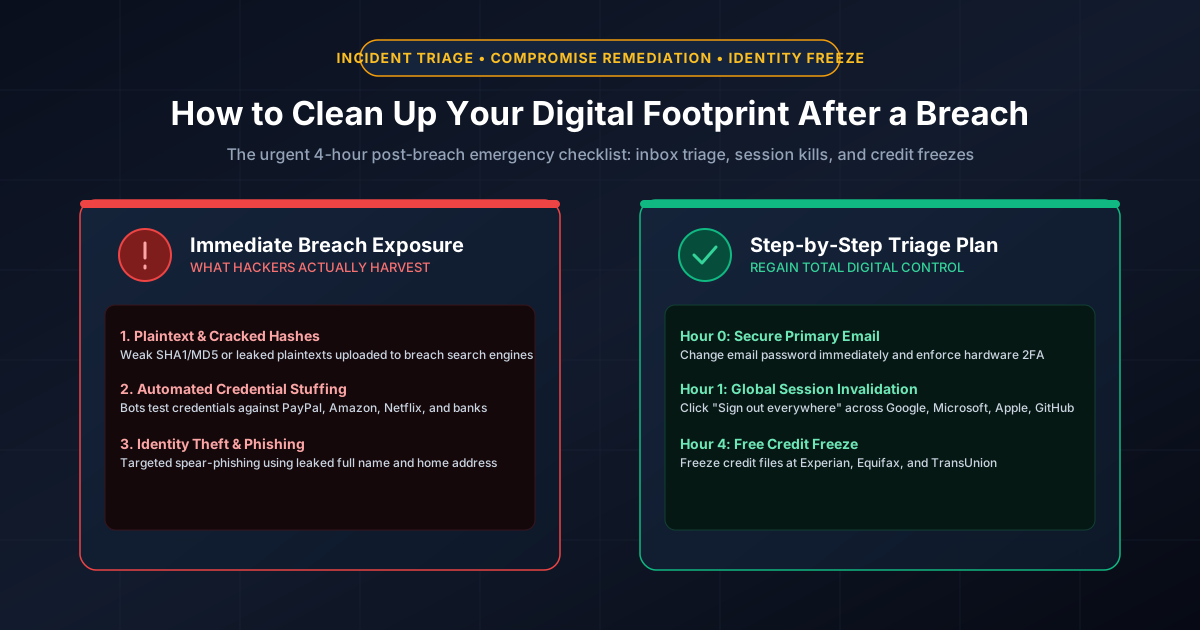
Figure 2.1: Post-breach incident triage: Systematic credential rotation and identity hardening.
Quick Answer: When you receive an alert that your email address, password, or identity data appeared in a major database leak (such as an Comb or corporate breach notification), immediate, structured incident response is essential. Do NOT panic and change random passwords haphazardly. Execute this 4-hour triage checklist in priority sequence: (1) Secure your primary email account with a 20+ character unique password and hardware 2FA, (2) Invalidate active sessions by clicking "Sign out of all devices" across major cloud accounts, (3) Rotate financial and password manager credentials, and (4) Place free security freezes on your credit files at Experian, Equifax, and TransUnion.
The Psychological Trap: Why Panicking Causes More Damage
When victims learn their data was compromised, their natural reaction is often counterproductive: they log into dozens of websites and rapidly change passwords to slight variations of an existing phrase (e.g., changing P@ssword2025! to P@ssword2026!). Threat actors anticipate this behavior.
Modern cybercrime syndicates utilize automated tools like Hashcat with rule-based wordlists (such as best64.rule) that instantly compute common incrementation patterns. An attacker armed with your leaked password can crack predictable variations in milliseconds. You must break the cycle by generating cryptographically random, independent secrets using our Password Generator or Passphrase Generator.
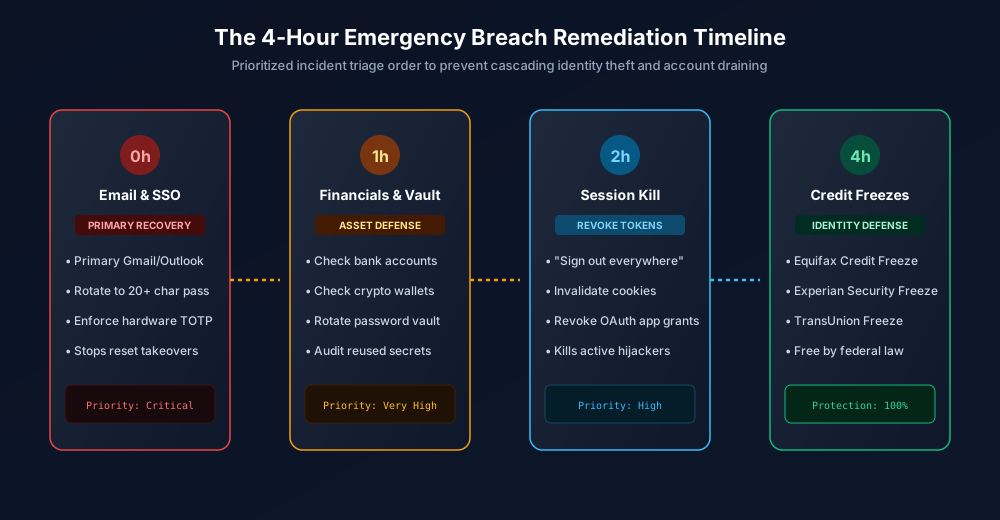
Figure 2.2: The 4-Hour Post-Breach Emergency Remediation Timeline.
The 4-Hour Emergency Breach Remediation Timeline
Hour 0: Secure Your Primary Email & Identity Provider (The Root of Trust)
Your primary email address (Gmail, Outlook, iCloud) is the master key to your digital identity. If an attacker controls your inbox, they can click "Forgot Password" on any other website, receive the reset link, and take over your accounts. Perform this triage immediately:
- Log into your email account from a known clean computer.
- Navigate to Security Settings and generate a fresh 20+ character random password.
- Upgrade Multi-Factor Authentication: Disable SMS verification and configure a TOTP authenticator app (1Password, Bitwarden, Google Authenticator) or a physical FIDO2 YubiKey.
- Audit mail forwarding rules: Attackers who briefly compromise inboxes often create automated forwarding filters to forward incoming emails containing words like "statement", "code", or "password" to an external mailbox. Delete all unauthorized filters.
Hour 1: Defend Financials, Crypto & Master Password Vaults
Next, isolate your economic assets:
- Check Bank & Brokerage Logins: Verify there are no unauthorized wire transfers or address changes. Update banking passwords and review authorized payment apps (Zelle, Venmo, PayPal).
- Change Master Vault Password: If your password manager master password was reused on the breached service, change your master passphrase immediately to a 6-word Diceware passphrase (77+ bits of entropy).
- Audit Cryptographic Wallets: Never enter seed phrases on any website or digital form. If you store crypto assets, ensure software wallets are locked and consider transferring assets to a hardware cold storage wallet (Ledger or Trezor).
Hour 2: The Global Session Kill (Revoking Rogue Cookies)
Changing your password does NOT always immediately kick out active attackers who hold valid session cookies (as explained in our guide to session cookie theft). You must manually terminate all active tokens:
- Google: Open Google Account > Security > Your Devices > Click Sign out of all sessions.
- Microsoft: Open Account Security > Advanced Security Options > Click Sign me out everywhere (revokes all active browser cookies within 24 hours).
- Apple: Open Apple ID Settings > Check the device list > Remove any unrecognized hardware.
- GitHub: Open Settings > Sessions > Click Revoke all other sessions.
Hour 4: Free Credit File Freezes (Blocking Identity Fraud)
If the data leak included your full legal name, date of birth, or Social Security Number (SSN), threat actors will attempt to open fraudulent credit cards, auto loans, or cellular phone contracts in your name. Under United States federal law (Economic Growth, Regulatory Relief, and Consumer Protection Act), freezing your credit report is 100% free and does not affect your credit score:
| Credit Bureau | Official Freeze Portal | Phone Hotline | Unfreeze Timing |
|---|---|---|---|
| Experian | experian.com/freeze | 1-888-397-3742 | Instant in app (1 hour via phone) |
| Equifax | equifax.com/credit-freeze | 1-800-685-1111 | Instant online |
| TransUnion | transunion.com/credit-freeze | 1-888-909-8872 | Instant online |
When your credit is frozen, banks cannot access your credit history. Any fraudulent credit application is rejected automatically. When you genuinely need to apply for a mortgage, loan, or credit card, you can temporarily lift ("thaw") the freeze online in under 60 seconds.
Ongoing Hygiene: Monitoring and Long-Term Protection
- Check Compromised Accounts: Use trusted aggregators like Have I Been Pwned to understand exactly which database exposed your data and what specific data fields (passwords, phone numbers, addresses) were leaked.
- Activate Carrier Port Locks: Prevent attackers from stealing your phone number to intercept SMS codes by setting up a SIM PIN and carrier port freeze.
- Migrate to Passkeys: As services support them, transition from passwords to passkeys. Passkeys are phishing-resistant and immune to database leaks. Review our breakdown on WebAuthn architecture.
- Check Password Strength: Audit your remaining accounts with our offline Password Strength Checker to eliminate legacy 8-character passwords.
Frequently Asked Questions
Does freezing my credit hurt my credit score?
No. Freezing your credit report has zero impact on your credit score, does not prevent you from using existing credit cards, and does not stop employers from running background checks. It simply prevents new credit accounts from being opened in your name without your explicit temporary thaw authorization.
How can I tell if an email claiming my password was leaked is a scam?
Check whether the email includes a generic threat demanding payment (e.g., cryptocurrency blackmail). Legitimate breach notifications come from official corporate communications and never demand payments or ask you to reply with credentials. You can independently verify breaches by searching your email on Have I Been Pwned without clicking links inside suspicious emails.
What is the difference between a credit freeze and a fraud alert?
A credit freeze blocks creditors from accessing your credit report completely, effectively stopping new credit lines. A fraud alert requires businesses to take extra steps to verify your identity (such as calling you) before opening an account, but does not completely lock down credit report access. A credit freeze offers significantly stronger legal protection.
Should I delete my account on a service that was breached?
If you no longer use the service, deleting your account is good digital hygiene. However, deleting your account after a breach does not erase data that attackers already downloaded. Your priority must be rotating credentials across other services where you may have reused that password.
Related password security guides
Best Password Practices for Small Businesses
A practical small business password safety guide covering password managers, MFA, shared accounts, staff changes, and admin access.
Bulk Password Generator Risks
Learn when bulk password generation is useful, when it creates risk, and how teams should handle many new passwords safely.
Business Password Safety Checklist
Use this practical password safety checklist to protect business email, admin accounts, cloud tools, freelancers, and shared access.
The tools work without analytics. Optional cookies help us understand page visits; passwords and form values are never collected.