
How to Generate Secure SSH Key Passphrases and Protect Your Private Keys
Build a compliant 2026 small business password policy with NIST length rules, password manager rollout steps, and MFA enforcement checklists.
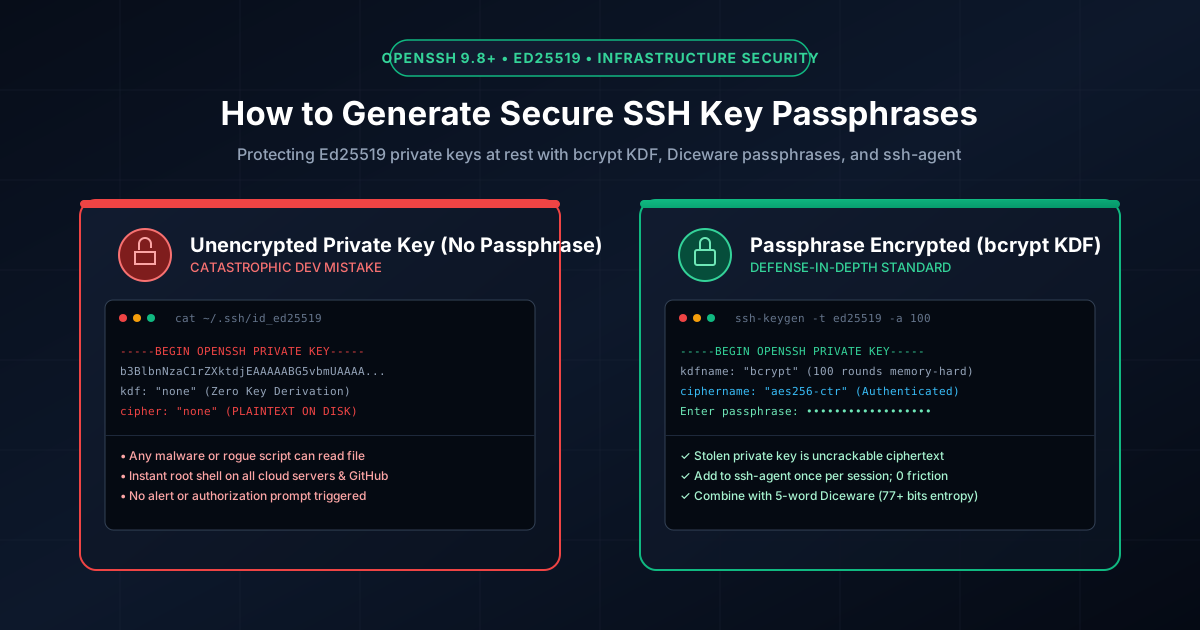
Figure 1.1: Cryptographic defense: Unencrypted SSH private key on disk vs. bcrypt KDF passphrase protection.
Quick Answer: An SSH key passphrase is a secret passphrase used to symmetrically encrypt your private SSH key on disk using AES-256-CTR and bcrypt key derivation. When an SSH key has no passphrase, anyone or any malicious process with file-read access to your workstation can instantly copy ~/.ssh/id_ed25519 and gain persistent, unauthenticated root access to your cloud servers, production databases, and Git repositories. Securing your key with a 5-to-6-word Diceware passphrase and managing it via ssh-agent provides military-grade security with zero daily login friction.
The Catastrophic Danger of Unencrypted SSH Keys
When developers run ssh-keygen and press Enter twice to skip the passphrase prompt, OpenSSH writes the private key file directly to the local filesystem without cryptographic protection. Inspecting an unencrypted key header reveals the vulnerability:
$ head -n 4 ~/.ssh/id_ed25519
-----BEGIN OPENSSH PRIVATE KEY-----
b3BlbnNzaC1rZXktdjEAAAAABG5vbmUAAAAEbm9uZQAAAAAAAAABAAAAMwAAAAtzc2gtZW
QyNTUxOQAAACDH7...
# kdfname: "none" | ciphername: "none" -> RAW UNENCRYPTED BYTES ON DISK
If your machine is infected with an infostealer malware, if a rogue dependency reads files via an npm postinstall script, or if an unencrypted backup or disk image is exposed, attackers gain instant access. Because SSH keys bypass multi-factor authentication on raw SSH server daemons, the adversary controls your production servers before your security operations center (SOC) detects an intrusion.
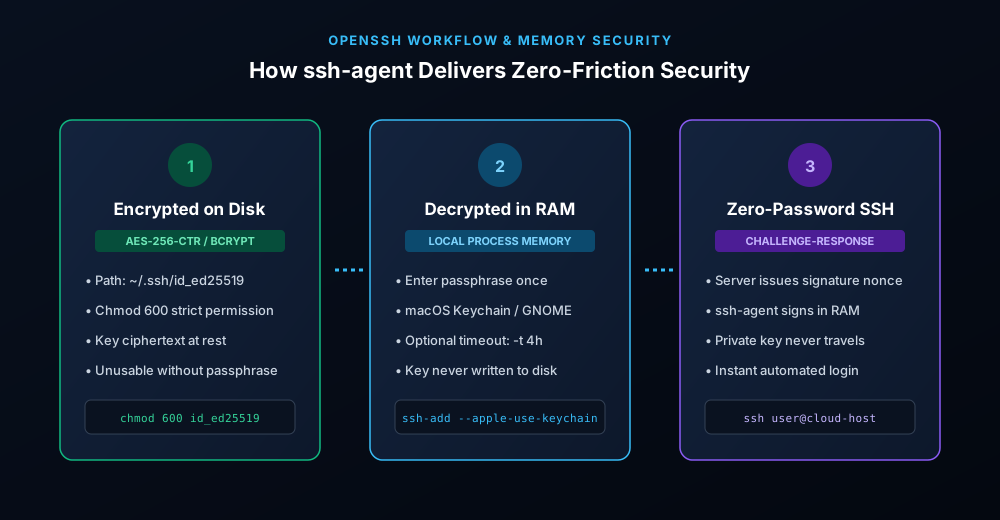
Figure 1.2: Cryptographic lifecycle: Encrypted ciphertext at rest, plaintext in RAM via ssh-agent, and zero-knowledge remote signing.
Generating Modern Ed25519 Keys with High-Round Key Derivation
In 2026, legacy 2048-bit RSA keys and DSA keys are obsolete and deprecated across modern Linux distributions. Standardize on Ed25519 (Edwards-curve Digital Signature Algorithm), which offers 128 bits of cryptographic security with compact 68-character public keys and immunity to timing attacks.
To maximize brute-force resistance against offline dictionary attacks, use the -a flag to increase the number of Key Derivation Function (KDF) rounds. OpenSSH uses bcrypt KDF, forcing attackers to compute memory-hard cryptographic hashes for every candidate passphrase:
# Generate modern Ed25519 key with 100 bcrypt KDF rounds
$ ssh-keygen -t ed25519 -a 100 -C "admin@production-cluster"

Generating public/private ed25519 key pair.
Enter file in which to save the key (/home/user/.ssh/id_ed25519):
Enter passphrase (empty for no passphrase): [ENTER SECURE PASSPHRASE]
Enter same passphrase again: [REPEAT SECURE PASSPHRASE]
The -a 100 argument forces OpenSSH to execute 100 bcrypt hashing iterations during key generation and decryption. While modern hardware decrypts this in approximately 120 milliseconds during local unlock, an attacker attempting to brute-force a leaked key file will take centuries to test dictionary permutations.
How to Add or Change a Passphrase on an Existing SSH Key
If you already have an active SSH key deployed across multiple remote servers and cannot afford to re-upload new public keys, you can encrypt your existing private key in place without modifying the public key or changing server authorizations:
# Update passphrase and upgrade to 100 bcrypt rounds in place
$ ssh-keygen -p -a 100 -f ~/.ssh/id_ed25519

Enter old passphrase: [ENTER CURRENT OR PRESS ENTER IF EMPTY]
Enter new passphrase: [ENTER STRONG PASSPHRASE]
Enter same passphrase again: [CONFIRM PASSPHRASE]
Your identification has been saved with the new passphrase.
Crafting a High-Entropy SSH Passphrase (Diceware Method)
Because SSH keys protect root-level server access, your passphrase should not be an arbitrary 8-character password. Instead, follow the NIST SP 800-63B guidelines and generate a 5-to-6-word Diceware passphrase. A 6-word passphrase sampled from a 7,776-word dictionary delivers over 77.5 bits of Shannon entropy:
relic-orbit-frost-falcon-canvas-timber(77.5 bits of entropy — mathematically uncrackable against nation-state clusters)harbor-quantum-siren-velvet-cobalt-summit(Easy to type quickly on mechanical keyboards; high muscle-memory retention)
Generate cryptographically secure multi-word passphrases using our offline, client-side Passphrase Generator, or verify your current phrase's resistance using our Password Strength Checker.
Eliminating Friction: ssh-agent and OS Keychain Integration
Entering a 6-word passphrase for every Git push or SSH session is tedious. The solution is ssh-agent, an authentication daemon that decrypts your key once into operating system RAM and performs remote cryptographic challenges without prompting you again during your work session:
1. Auto-Expiring Agent Cache (Linux & macOS)
To avoid leaving private keys decrypted in memory indefinitely, configure ssh-add with a lifetime timeout (e.g., 4 hours):
# Cache private key in memory for 4 hours only
$ ssh-add -t 4h ~/.ssh/id_ed25519
Enter passphrase for ~/.ssh/id_ed25519: [ENTER PASSPHRASE]
Identity added: ~/.ssh/id_ed25519 (4h)
2. Native Apple Keychain Integration (macOS)
On macOS Sonoma and Sequoia, you can store your SSH passphrase securely in the hardware Secure Enclave and Apple Keychain so it unlocks automatically on biometric login. Add this block to your ~/.ssh/config:
Host *
  AddKeysToAgent yes
  UseKeychain yes
  IdentityFile ~/.ssh/id_ed25519
Comparison Matrix: SSH Private Key Protection Strategies
| Storage Strategy | Protection at Rest | Stealer / Malware Risk | Developer Friction | Security Rating |
|---|---|---|---|---|
| Unencrypted Disk Key | None (Plaintext) | Critical (Instant breach) | Zero prompts | F (Unacceptable) |
| Passphrase Encrypted (Standard) | AES-256 + 16 bcrypt rounds | Low (Offline brute-force required) | Prompts on every connection | B+ (Solid) |
| Passphrase + ssh-agent (Recommended) | AES-256 + 100 bcrypt rounds | Very Low (In-memory, auto-expiring) | 1 prompt per workday | A (Industry Standard) |
| FIDO2 Hardware Key (ed25519-sk) | Physical Secure Element (YubiKey) | Immune (Key cannot leave hardware) | Physical touch required | A+ (Zero-Trust) |
Auditing File Permissions on Your Local Machine
OpenSSH enforces strict POSIX file permissions. If permissions are too open, the SSH client refuses to authenticate to protect against multi-user reading attacks. Run this command to enforce correct least-privilege permissions across your workstation:
# Enforce strict POSIX permissions on SSH keys and config
$ chmod 700 ~/.ssh
$ chmod 600 ~/.ssh/id_ed25519
$ chmod 644 ~/.ssh/id_ed25519.pub
$ chmod 600 ~/.ssh/authorized_keys
$ chmod 600 ~/.ssh/config
For automated password rotations and infrastructure tokens, review our companion guides on API Keys vs Tokens vs Passwords and FIDO2 Passkeys.
Frequently Asked Questions
Can a lost or forgotten SSH key passphrase be recovered?
No. OpenSSH passphrase encryption uses modern symmetric cryptography (AES-256-CTR with bcrypt key derivation). There are no backdoors, recovery questions, or admin overrides. If you forget the passphrase and have not cached the key in a running agent or password manager vault, the private key is permanently lost and you must generate a new key pair.
Does changing an SSH key passphrase require re-configuring remote servers?
No. Your passphrase only encrypts the private key on your local machine. The public key (stored on remote servers in ~/.ssh/authorized_keys) remains identical. You can change your passphrase at any time with ssh-keygen -p without server interruption.
Why should I use -a 100 when generating an Ed25519 key?
The -a flag sets the number of bcrypt KDF rounds. The default value (16) is fast, but modern GPUs can attempt millions of guesses per hour. Setting -a 100 or -a 128 forces the CPU to spend approximately 100ms per attempt, making brute-force dictionary attacks against a stolen key file computationally impossible.
Is an unencrypted SSH key ever acceptable in CI/CD pipelines?
Only when using tightly scoped GitHub Deploy Keys or GitLab CI Deploy Tokens restricted to read-only access for a single repository, combined with strict firewall or IP-whitelisting rules. You should never use an unencrypted personal or administrator SSH key in automated scripts.
Related password security guides
Best Password Practices for Small Businesses
A practical small business password safety guide covering password managers, MFA, shared accounts, staff changes, and admin access.
Bulk Password Generator Risks
Learn when bulk password generation is useful, when it creates risk, and how teams should handle many new passwords safely.
Business Password Safety Checklist
Use this practical password safety checklist to protect business email, admin accounts, cloud tools, freelancers, and shared access.
The tools work without analytics. Optional cookies help us understand page visits; passwords and form values are never collected.