
Hardware Security Keys (YubiKey) vs. Authenticator Apps vs. Passkeys: Which Is Best?
Build a compliant 2026 small business password policy with NIST length rules, password manager rollout steps, and MFA enforcement checklists.
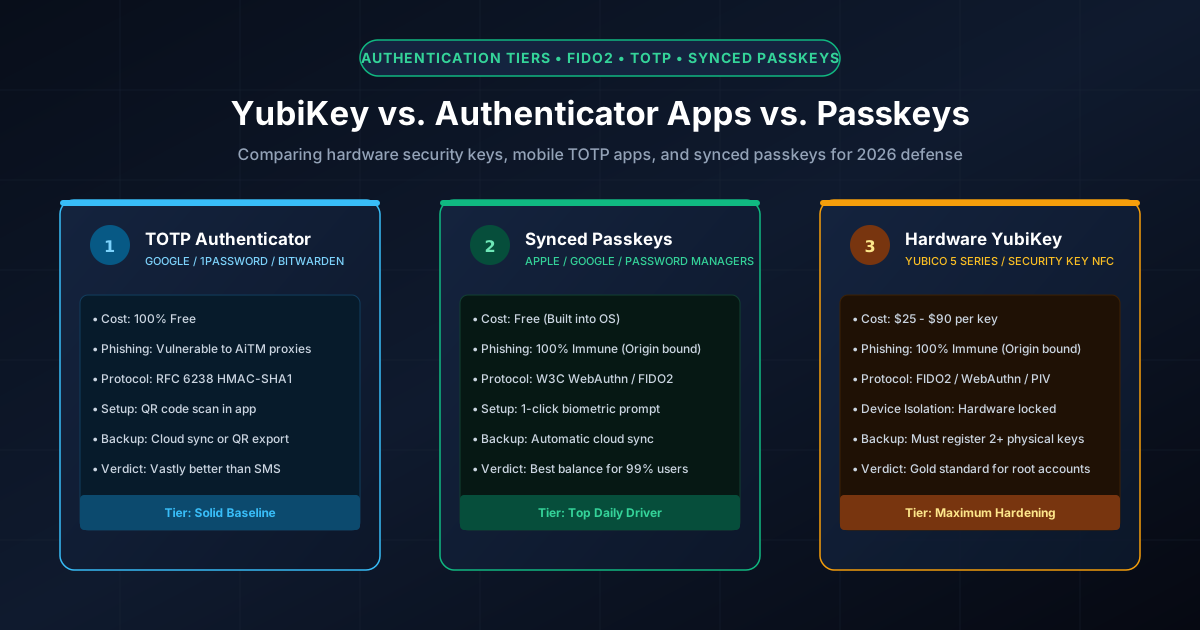
Figure 1.1: Authentication tiers: Hardware security keys vs. mobile TOTP authenticator apps vs. synced passkeys.
Quick Answer: When securing your online accounts, hardware security keys (YubiKey) and synced passkeys represent the gold standard because both utilize cryptographic FIDO2 / WebAuthn origin-binding that completely prevents real-time reverse-proxy phishing (such as Evilginx). While TOTP authenticator apps (Google Authenticator, Bitwarden, 1Password) are free and far superior to SMS codes, they remain vulnerable to adversary-in-the-middle phishing because a victim can unknowingly type a 6-digit code into a fake website. For root-level credentials (primary email, cloud infrastructure, password manager master vaults), a physical YubiKey provides unmatched device-bound isolation, while synced passkeys provide the optimal balance of zero friction and phishing immunity for daily consumer apps.
Deconstructing the Three Authentication Paradigms
To choose the right security architecture for your digital life or enterprise, understand the technical differences between these three technologies:
- Time-Based One-Time Passwords (TOTP): Standardized under RFC 6238, your authenticator app shares a secret cryptographic seed (symmetric key) with the server. Every 30 seconds, the app hashes the current Unix epoch timestamp with that seed using HMAC-SHA1 to produce a 6-digit numerical token.
- Multi-Device Synced Passkeys: Standardized by the FIDO Alliance and W3C WebAuthn, passkeys replace passwords entirely using public-key asymmetric cryptography. Your device generates an asymmetric key pair; the public key sits on the server, while the private key syncs end-to-end encrypted across your Apple, Google, or password manager cloud ecosystem.
- Hardware Security Keys (YubiKey 5 Series): Dedicated physical cryptographic tokens (USB-A, USB-C, NFC, Lightning) containing an isolated secure element chip. Private keys are generated directly on the silicon and can never be exported or copied to software, requiring a physical touch to authorize signatures.
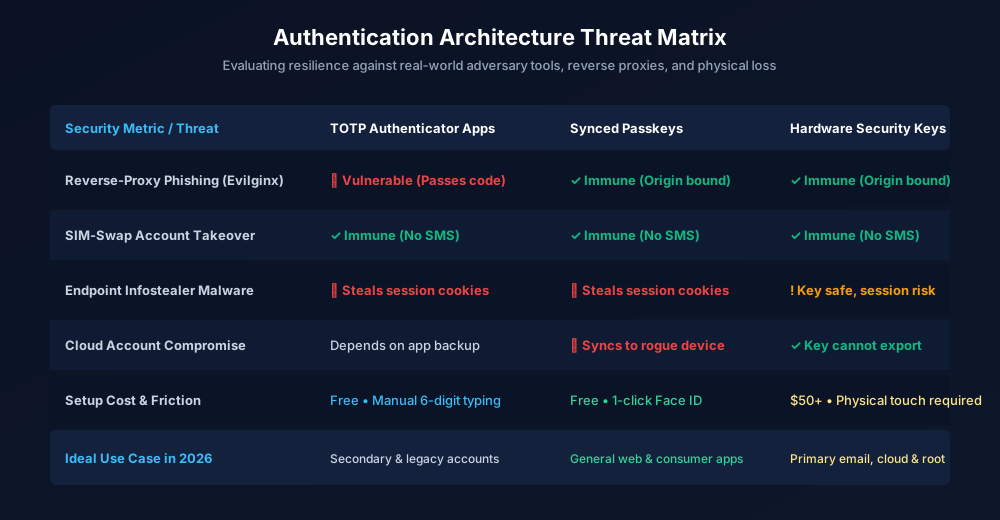
Figure 1.2: Threat matrix: Evaluating phishing immunity, malware resilience, and recovery workflows.
The Phishing Gap: Why Reverse Proxies Bypass Authenticator Apps
Many users believe that using an authenticator app makes them immune to phishing. This is dangerously incorrect. Modern cybercrime kits (such as Evilginx3 and Modlishka) operate as transparent reverse proxies between the victim and the legitimate service:
- The attacker tricks you into clicking a phishing link that proxies traffic to
login.microsoftonline.com. - You type your username and password into the proxy. The proxy forwards them in real time to Microsoft.
- Microsoft prompts for your 6-digit authenticator code. The phishing proxy displays an identical prompt to you.
- You open your authenticator app, read the code, and enter it. The proxy intercepts the code and transmits it to Microsoft within its 30-second validity window.
- Microsoft authenticates the session and returns an HTTP session cookie. The phishing proxy captures the cookie and logs in as you.
Why Passkeys & YubiKeys Defeat This: WebAuthn relies on cryptographic origin binding enforced by the browser runtime (as detailed in our WebAuthn guide). Even if you visit a counterfeit domain, the browser passes the attacker's fake domain string to your YubiKey or passkey. Because the cryptographic signature only matches the authentic domain, the authentication challenge fails instantly with zero user intervention.
Feature Comparison: The Complete Decision Matrix
| Evaluation Factor | TOTP Authenticator Apps | Synced Passkeys | Hardware YubiKey |
|---|---|---|---|
| Phishing Resistance | Low (Vulnerable to AiTM) | 100% (Cryptographic Origin Binding) | 100% (Cryptographic Origin Binding) |
| Private Key Portability | Exportable via QR code | Synchronized via Apple/Google cloud | Hardware-bound (Never leaves chip) |
| Daily Login Friction | Manual (Open app, read 6 digits, type) | Zero (1-click Face ID / Touch ID) | Low (Insert key and tap contact) |
| Financial Cost | Free | Free (Included in OS & browser) | to per key (Need minimum 2) |
| Backup & Recovery Complexity | Simple (Cloud sync or secret seed) | Automatic (iCloud / Google account) | Manual (Must pair a backup key) |
The Recommended Defense-in-Depth Strategy for 2026
Rather than choosing exclusively one technology, top cybersecurity professionals use a layered tiering strategy:
- Tier 1 — Hardware YubiKeys (The Root of Trust): Enforce physical YubiKeys on your "crown jewel" accounts: primary email (Google Advanced Protection / Microsoft Account), password manager master vaults (1Password / Bitwarden), AWS/GCP root consoles, and GitHub Enterprise. Register two separate keys: one on your keychain, and a backup stored in a home safe.
- Tier 2 — Synced Passkeys (Daily Productivity): For consumer services, shopping sites, entertainment portals, and work tools that support WebAuthn, adopt synced passkeys. They provide total phishing immunity with instant biometric sign-in across macOS, iOS, Windows, and Android.
- Tier 3 — TOTP Authenticator Apps (Legacy Fallback): For websites that have not yet implemented passkey support and do not support FIDO2 keys (such as older banking portals or government services), use a standalone TOTP authenticator app. Never allow fallback to SMS text verification.
To configure strong master passwords for fallback accounts or generate high-entropy FIDO2 PINs, use our client-side PIN Generator, Password Generator, and verify your credentials with our offline Password Strength Checker.
For more architectural comparisons, explore our guides on Passkeys vs Passwords and Can Passkeys Be Hacked?.
Frequently Asked Questions
Do I still need a YubiKey if I already use passkeys on my phone?
For 95% of users, synced passkeys provide more than enough security with zero daily friction. However, a YubiKey provides physical, air-gapped isolation: the private key cannot be extracted or synced across the cloud. If you are an IT administrator, crypto investor, or high-value target, a YubiKey protects your root accounts even if your Apple ID or Google cloud account is compromised.
What happens if I lose my YubiKey?
Because YubiKey private keys are hardware-bound and cannot be duplicated, losing your key would lock you out unless you registered a backup. Always buy and register at least TWO security keys simultaneously: your primary key for daily use, and a secondary backup key stored safely in a fireproof home safe or safe deposit box.
Why is SMS two-factor authentication considered dangerous compared to TOTP?
SMS messages travel unencrypted over telephone provider networks and are vulnerable to SIM-swap social engineering attacks and SS7 cellular network interception. A criminal who redirects your phone number receives your SMS verification codes without touching your device. Authenticator apps and security keys generate codes locally and cannot be intercepted via telephone networks.
Which YubiKey should I buy for everyday consumer use?
For modern computers and smartphones, the Security Key Series by Yubico (NFC and USB-C) is the most cost-effective choice (), providing full FIDO2/WebAuthn passkey support. If you require legacy protocols like PIV smart cards, OpenPGP encryption, or static passwords, upgrade to the YubiKey 5 Series (–).
Related password security guides
Best Password Practices for Small Businesses
A practical small business password safety guide covering password managers, MFA, shared accounts, staff changes, and admin access.
Bulk Password Generator Risks
Learn when bulk password generation is useful, when it creates risk, and how teams should handle many new passwords safely.
Business Password Safety Checklist
Use this practical password safety checklist to protect business email, admin accounts, cloud tools, freelancers, and shared access.
The tools work without analytics. Optional cookies help us understand page visits; passwords and form values are never collected.