
Why Mandatory 90-Day Password Rotation Is Dead: What Experts Recommend Instead
Build a compliant 2026 small business password policy with NIST length rules, password manager rollout steps, and MFA enforcement checklists.
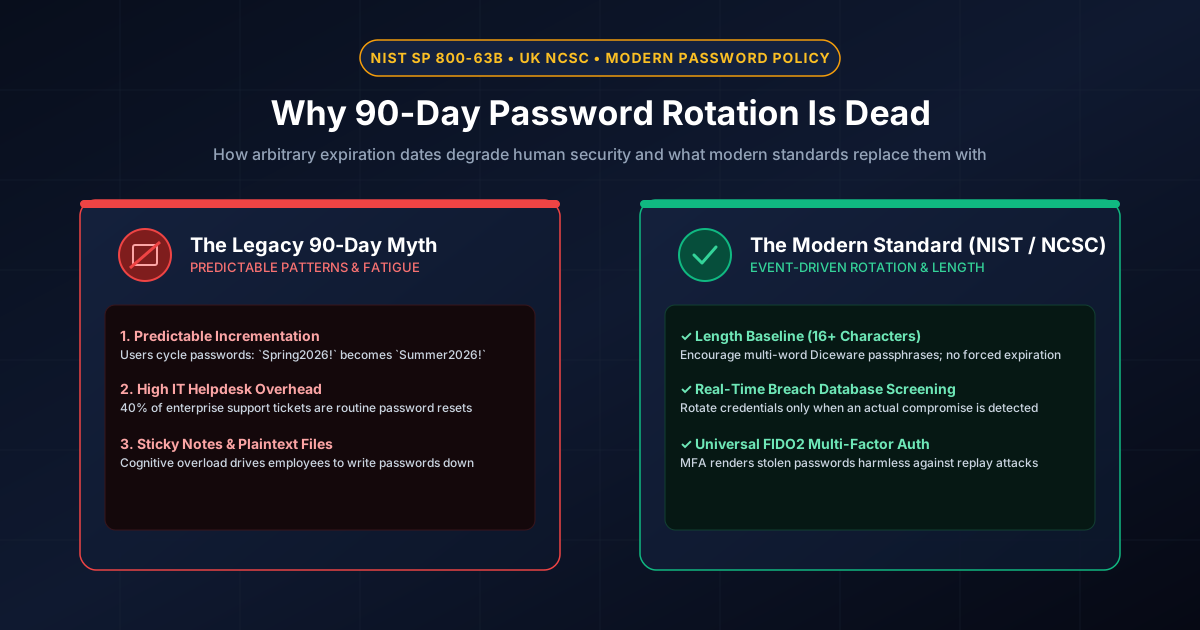
Figure 1.1: Modern identity standards: Retiring calendar-based password expiration in favor of event-driven defense.
Quick Answer: Mandatory 90-day password rotation is officially dead and deprecated by the world's leading cybersecurity authorities, including the National Institute of Standards and Technology (NIST SP 800-63B), the UK National Cyber Security Centre (NCSC), CISA, and Microsoft. Empirical security studies prove that forcing employees to change passwords every 90 days actually reduces security: users experience cognitive fatigue and resort to predictable character transformations (such as changing Autumn2026! to Winter2026!) or writing passwords on physical sticky notes. The modern standard replaces arbitrary calendar expirations with 16+ character length baselines, automated breach database screening, and mandatory phishing-resistant MFA.
The Historical Origin of the 90-Day Rule
The 90-day password expiration rule originated in the late 1980s and early 1990s, when passwords were encrypted using primitive algorithms like DES-crypt or LM-hash and stored on offline mainframe magnetic tapes. In that era, the mathematical assumption was that an attacker stealing a password hash would require roughly 90 days of offline compute to crack the hash. By forcing a password reset every three months, administrators hoped to invalidate the cracked password before the attacker could use it.
In 2026, this logic is completely divorced from cybercrime reality. Attackers do not steal single password hashes and spend 90 days cracking them on a single workstation. They use automated cloud GPU clusters that crack weak hashes in minutes, or bypass passwords entirely using infostealer malware, session cookie theft, and adversary-in-the-middle phishing. If an employee's password is breached on day 2 of a 90-day cycle, the attacker has 88 uninterrupted days of unauthorized access before the calendar rule triggers a reset.
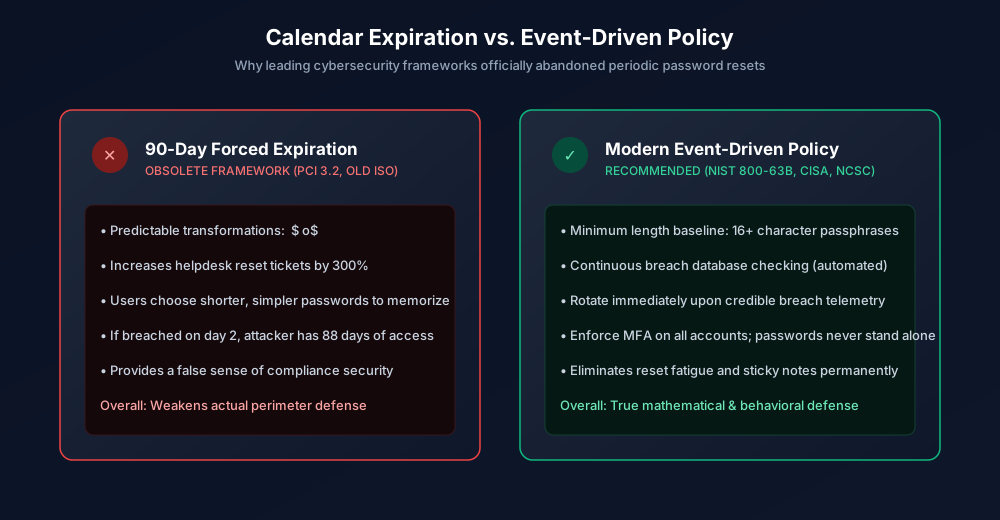
Figure 1.2: Empirical comparison: Obsolete 90-day calendar policy vs. modern NIST event-driven security.
The Psychology of User Password Fatigue
Behavioral cybersecurity research from Carnegie Mellon University and the University of North Carolina revealed consistent human patterns when organizations mandate frequent password changes:
- Predictable Incrementation (The "Transformations" Problem): When forced to pick a new password every 90 days, users never generate an entirely new, high-entropy secret. Instead, they take an existing password and apply minor predictable mutations: incrementing a number (
Company2025!$\to$Company2026!), cycling months/seasons, or appending an exclamation mark. Attackers configure tools like Hashcat with custom mutation rules that crack these transformations instantly. - Decreasing Entropy: As users anticipate future forced resets, they consciously choose shorter, simpler passwords that are easy to remember and adapt. A user who would happily memorize a permanent 24-character passphrase will choose a 10-character weak phrase if they know IT will force them to abandon it in 90 days.
- Helpdesk Economic Drain: Password resets account for 30% to 50% of all enterprise IT helpdesk tickets. According to Forrester Research, the average cost to an enterprise of a single manual helpdesk password reset is over in labor, creating massive corporate friction with negative security returns.
What Official Standards Mandate in 2026
1. NIST SP 800-63B (Section 5.1.1.2)
The NIST Digital Identity Guidelines state explicitly:
"Verifiers SHOULD NOT require that passwords be changed arbitrarily (e.g., periodically). However, verifiers SHALL force a change if there is evidence of compromise of the authenticator."
2. UK National Cyber Security Centre (NCSC)
The UK government's NCSC guidance notes that periodic password expiration is "an ineffective security control that harms both users and security posture." They recommend that organizations eliminate expiry policies entirely and deploy single sign-on (SSO) with multi-factor authentication.
3. Microsoft Identity Protection Baseline
Microsoft removed periodic password expiration from its Windows and Microsoft 365 security baselines, noting: "When a human is forced to change their password, they too often pick a predictable variation... If an uncompromised password has sufficient entropy, forcing a reset makes the user less safe."
The 4-Pillar Modern Password Policy Framework
If you abandon the 90-day rule, what should your organization implement instead? Modern zero-trust authentication relies on four foundational pillars:
| Control Pillar | Technical Implementation | Security Benefit |
|---|---|---|
| 1. Length Over Complexity | Enforce 14-to-16+ characters minimum; eliminate arbitrary symbol rules | Exponential keyspace expansion; enables multi-word Diceware passphrases |
| 2. Real-Time Breach Screening | API integration against Have I Been Pwned / Entra Password Protection | Rejects passwords known to cybercriminals before creation is finalized |
| 3. Universal MFA Enforcement | Mandatory FIDO2 WebAuthn passkeys or TOTP with number matching | Stolen passwords alone cannot authenticate; blocks credential stuffing |
| 4. Event-Driven Rotation Only | Force resets ONLY upon detected breach telemetry or role termination | Eliminates password fatigue, sticky notes, and helpdesk support tickets |
To assist users in generating robust, permanent passphrases that resist modern GPU cracking clusters, direct them to our client-side, zero-knowledge Passphrase Generator or Password Generator, and test policy strength with our offline Password Strength Checker.
For more compliance standards, explore our guides on NIST 800-63B & PCI DSS 4.0 Rules and SOC 2 Password Requirements.
Frequently Asked Questions
Does PCI DSS 4.0 still require 90-day password expiration?
Under PCI DSS v4.0 (effective March 2025), Requirement 8.3.9 allows organizations to eliminate 90-day password rotation IF they enforce multi-factor authentication (MFA) and implement dynamic real-time controls that analyze user access security. PCI DSS has finally modernized to align with NIST guidelines.
When SHOULD a password be changed in a modern security policy?
A password should ONLY be changed when there is credible evidence of a compromise: (1) if the account appears in a verified public breach database, (2) if the user accidentally entered their credentials into a phishing portal, (3) if the user workstation was infected with malware, or (4) during an employee offboarding or role reassignment event.
Why did NIST recommend 90-day expiration in the first place?
In early computer networks (1980s), passwords were short and hashing algorithms were weak (such as Unix DES). The 90-day rule was designed to outrun offline cracking computers of that era. Today, with cloud GPU cracking clusters and modern salted hashes like Argon2id, arbitrary calendar rotation does not stop attacks and merely causes human fatigue.
How can IT administrators prevent users from choosing weak permanent passwords?
Admins should enforce an IdP-level blacklist of common words, dictionary terms, and breached credentials (e.g., via Azure AD Password Protection or Okta Password Policy). Combined with a 16-character minimum length requirement, users are guided toward generating high-entropy multi-word passphrases that remain mathematically unbreakable for decades.
Related password security guides
Best Password Practices for Small Businesses
A practical small business password safety guide covering password managers, MFA, shared accounts, staff changes, and admin access.
Bulk Password Generator Risks
Learn when bulk password generation is useful, when it creates risk, and how teams should handle many new passwords safely.
Business Password Safety Checklist
Use this practical password safety checklist to protect business email, admin accounts, cloud tools, freelancers, and shared access.
The tools work without analytics. Optional cookies help us understand page visits; passwords and form values are never collected.