
PostgreSQL and MySQL Database Password Best Practices: Generation & Secrets Management
Build a compliant 2026 small business password policy with NIST length rules, password manager rollout steps, and MFA enforcement checklists.
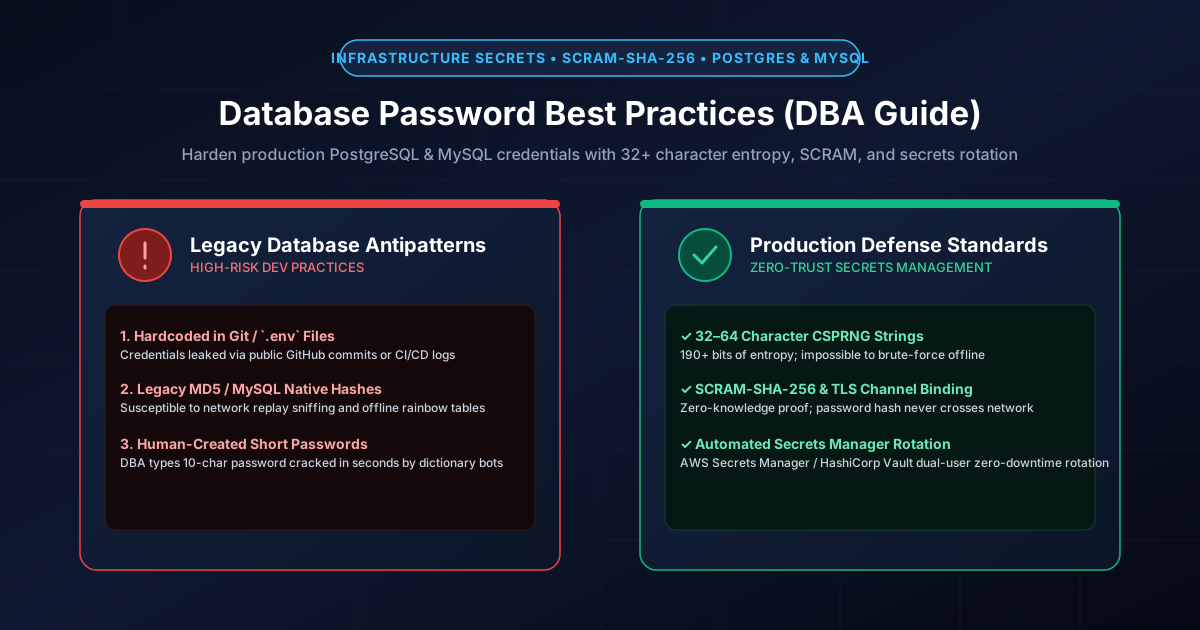
Figure 1.1: Database security architecture: High-entropy generation, SCRAM authentication, and secrets manager rotation.
Quick Answer: Database passwords are programmatic secrets used by backend applications and connection pools rather than humans. As a result, database credentials must follow stricter engineering standards: generate a minimum of 32 random alphanumeric characters (providing over 190 bits of cryptographic entropy), configure SCRAM-SHA-256 authentication in PostgreSQL (deprecating legacy md5), enforce caching_sha2_password in MySQL 8.0+, and completely eliminate hardcoded credentials in source code by integrating dedicated secrets vaults (HashiCorp Vault, AWS Secrets Manager, or Google Cloud Secret Manager) with automated zero-downtime rotation.
The Critical Differences Between User Passwords and Database Credentials
Unlike human login credentials, database passwords have unique characteristics that dictate their design and management:
- Zero Human Memorization Overhead: Database passwords are typed once into an orchestration environment variable or fetched dynamically via API. Because no engineer needs to memorize them, lengths of 32 to 64 characters carry zero productivity penalty.
- Systemic Impact of Compromise: A compromised user password exposes a single user's account; a compromised production database credential exposes the entire relational data store, customer records, payment tokens, and proprietary intellectual property.
- High-Frequency Automated Connection Pools: Application servers open dozens or hundreds of concurrent database connections via pooling daemons (such as PgBouncer or ProxySQL). The password must withstand high-concurrency authentication challenges without performance bottlenecks.
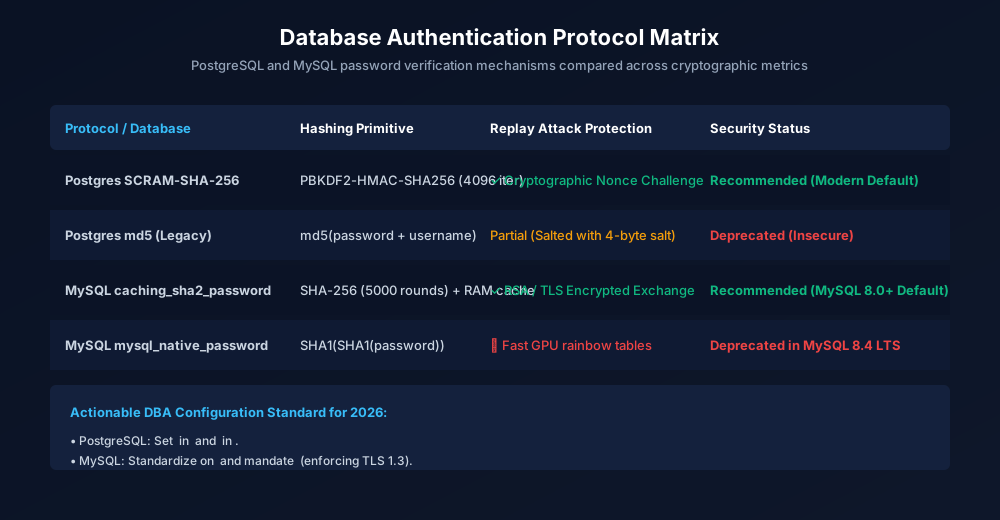
Figure 1.2: Modern vs legacy database authentication protocols across PostgreSQL and MySQL.
Entropy & Character Set Traps: Why Connection Strings Break
While maximum character variety is recommended for user accounts, database credentials frequently cause runtime parsing bugs when unescaped special characters are included in connection string URIs:
postgresql://[user]:[password]@[host]:[port]/[database]
# BROKEN URI (Raw '@' or ':' in password halts parser):
postgresql://app_svc:P@ss:w0rd!@db.internal:5432/production
# CORRECT: 32+ Pure Alphanumeric (A-Z, a-z, 0-9) OR Percent-Encoded URI:
postgresql://app_svc:f8K9vQ2mX4rL7nB1zW6cT3yP0dE5sJ8h@db.internal:5432/production
A 32-character string selected from 62 alphanumeric characters (uppercase, lowercase, digits) yields \( 32 \times \log_2(62) \approx 190.5 \) bits of cryptographic entropy. This provides unbreakable resistance against offline brute-force attacks while avoiding URI parsing exceptions across Python (SQLAlchemy, psycopg2), Node.js (pg, mysql2), Go (database/sql), and Java (JDBC). Generate high-entropy programmatic passwords instantly with our Password Generator or 24+ Character Generator.
PostgreSQL Hardening: Enforcing SCRAM-SHA-256
Legacy PostgreSQL installations utilized md5 password hashing. In PostgreSQL's MD5 implementation, the password hash is computed as md5(password + username), which is vulnerable to rainbow table attacks and precomputed dictionary cracking once pg_authid is dumped.
To enforce the modern Salted Challenge Response Authentication Mechanism (SCRAM-SHA-256):
- In
postgresql.conf, set the encryption standard:password_encryption = 'scram-sha-256'
- In
pg_hba.conf, requirescram-sha-256for host connections:# TYPE DATABASE USER ADDRESS METHOD host all all 10.0.0.0/16 scram-sha-256
- Rotate existing user passwords so their hashes in
pg_authidare upgraded from MD5 to SCRAM-SHA-256:ALTER USER app_service WITH PASSWORD 'new_high_entropy_secret_32_chars';
MySQL 8.0+ Hardening: Transitioning to Caching SHA-2
MySQL 8.0 set caching_sha2_password as the default authentication plugin, replacing the legacy mysql_native_password (which used double SHA-1 hashing). caching_sha2_password utilizes salted SHA-256 hashing combined with in-memory server-side caching to achieve sub-millisecond connection re-authentication for high-throughput microservices.
Verify that your database users are configured with the secure plugin:
-- Query current authentication plugins
SELECT user, host, plugin FROM mysql.user;

-- Upgrade user to caching_sha2_password
ALTER USER 'app_service'@'10.0.%.%' IDENTIFIED WITH caching_sha2_password BY 'secure_passphrase_or_alphanumeric_32';
Database Authentication Protocol Comparison
| Protocol & Engine | Underlying Hash Algorithm | Salt / Iterations | Replay & Eavesdrop Defense | Status for 2026 |
|---|---|---|---|---|
| PostgreSQL SCRAM-SHA-256 | HMAC-SHA-256 (RFC 7677) | Per-user 32-byte salt + 4,096 iterations | Cryptographic Mutual Auth (Zero password transmission) | Recommended Standard |
| MySQL caching_sha2_password | SHA-256 with In-Memory Caching | Cryptographic 20-byte nonce salt | RSA asymmetric key pair or TLS required for full handshake | Recommended Standard |
| PostgreSQL MD5 (Legacy) | MD5(password + username) | Zero salt (username used as static salt) | Basic challenge-response (weak) | Deprecated (Vulnerable to GPU cracking) |
| MySQL mysql_native_password | Double SHA-1 (SHA1(SHA1(pass))) | Static internal mechanism | Vulnerable to rainbow table lookup if traffic sniffed | Deprecated (Removed in MySQL 8.4 LTS) |
Zero-Downtime Credential Rotation: The Dual-Account Pattern
Rotating database credentials without taking production applications offline requires a phased dual-account rollover:
- Stage 1 (Create Successor Account): Create a secondary database user with identical grant privileges:
CREATE USER app_svc_b WITH PASSWORD 'new_vault_generated_secret_32';
GRANT SELECT, INSERT, UPDATE, DELETE ON ALL TABLES IN SCHEMA public TO app_svc_b;
- Stage 2 (Update Secrets Vault): Store the new credentials in your secrets manager (e.g., HashiCorp Vault or AWS Secrets Manager). Trigger a rolling deployment or dynamic configuration refresh on your application servers.
- Stage 3 (Monitor Connection Pool Migration): Inspect database connection activity to confirm that active connection threads are using
app_svc_band thatapp_svc_ahas dropped to zero active queries:SELECT usename, count(*) FROM pg_stat_activity GROUP BY usename;
- Stage 4 (Deprecate & Remove): Revoke connection privileges from
app_svc_aand drop the obsolete user after a 48-hour observation buffer.
The Modern Frontier: Passwordless Cloud IAM Authentication
Modern cloud architectures on Amazon Web Services (AWS RDS IAM Authentication), Google Cloud (Cloud SQL Auth Proxy with IAM), and Microsoft Azure (Azure Entra Managed Identities) allow developers to eliminate static database passwords entirely. Under this paradigm, application pods request short-lived (15-minute) ephemeral OAuth tokens signed by the cloud control plane. Even if an attacker compromises a server's memory, the ephemeral token expires before it can be exfiltrated and reused.
For additional server and infrastructure security best practices, consult our comprehensive guides on API keys and secrets management, SSH Ed25519 vs RSA key hardening, and router credential hardening.
Frequently Asked Questions
Why should database passwords be at least 32 characters long?
Because database passwords are stored and processed programmatically by application servers and configuration managers, there is zero human memorization penalty. A 32-character alphanumeric password provides ~190.5 bits of cryptographic entropy, making offline brute-force or GPU dictionary attacks impossible even if database dump files are leaked.
Why do special characters cause database connection string failures?
Database connection strings follow standard URI specification (RFC 3986). Characters such as @, :, /, ?, and # serve as protocol delimiters. An unescaped @ or : inside a password string will prematurely truncate the credential field, causing connection handshake failures unless explicitly percent-encoded (e.g., %40 for @).
How does SCRAM-SHA-256 protect PostgreSQL from password dumping?
Legacy PostgreSQL MD5 stored a simple unsalted hash md5(password + username), which could be attacked with precomputed rainbow tables. SCRAM-SHA-256 employs PBKDF2 with a cryptographically secure random salt and thousands of iterations, making offline hash reversal prohibitively expensive while executing authentication via mutual challenge-response.
What is the safest way to store database passwords in Kubernetes and Docker?
Never hardcode database credentials in Dockerfiles, Git repositories, or plain ConfigMaps. Instead, inject secrets at runtime as environment variables or mounted volume files using external secret synchronizers (like HashiCorp Vault, AWS Secrets Manager, or Kubernetes External Secrets Operator) with strict RBAC access controls.
Related password security guides
Best Password Practices for Small Businesses
A practical small business password safety guide covering password managers, MFA, shared accounts, staff changes, and admin access.
Bulk Password Generator Risks
Learn when bulk password generation is useful, when it creates risk, and how teams should handle many new passwords safely.
Business Password Safety Checklist
Use this practical password safety checklist to protect business email, admin accounts, cloud tools, freelancers, and shared access.
The tools work without analytics. Optional cookies help us understand page visits; passwords and form values are never collected.